


© IE Online Media Services Pvt Ltd
Tags:


With the exception of a few, almost all the Android phones now come with Split Screen feature that lets you use two apps on your phone simultaneously. The mode comes handy when you want to multi-task— you can scroll down on your Instagram feed while chatting with a friend on WhatsApp or watch a video in the half screen while utilising the other half to scan Twitter.
Notably, some apps do not work in Split Screen mode including games and other applications that require the full screen to function. Also, the process to activate the mode is a bit different for different Android skins provided by their respective manufacturers.


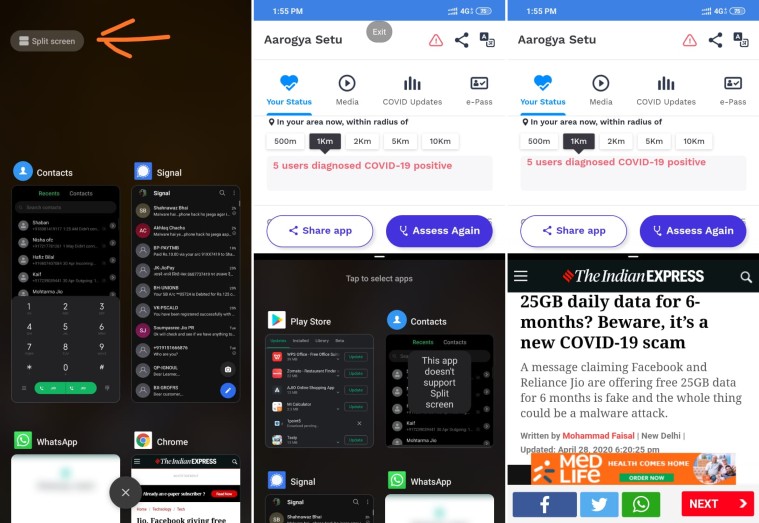
The next step is different for Android phones from different manufacturers.
For Xiaomi phones, as soon as you enter the recent apps menu, you will see the “Split Screen” option at the top left corner. Tapping on it will let you enter the mode and you can now tap and drag an app to the upper part of the screen to open it in split-screen.
Also read | How to sanatise your smartphone during coronavirus outbreak
Alternatively, you can tap and hold on an app and then tap on the Split Screen icon to enter the mode. Now, tap on the second app you want to use in split-screen.
The second method works for almost all Android phones. As soon as you select the other app, both the apps will start running simultaneously. You can switch between them with just a single tap.
Express Tech is now on Telegram. Click here to join our channel (@expresstechnology) and stay updated with the latest tech news
A black bar acts as the separator between the two apps and you can increase or decrease the area taken by an app by moving this bar up or down. When you are done using the mode, shrink the window using the black bar and you will be left with only a single app on your screen.


