3 min read
© IE Online Media Services Pvt Ltd



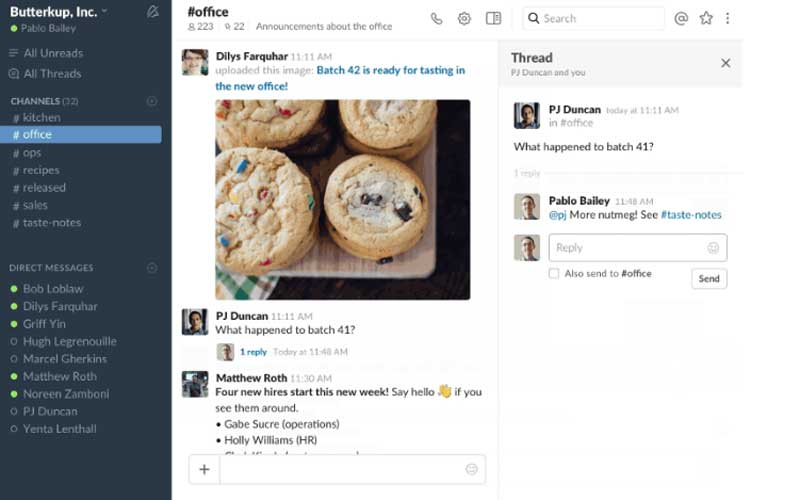 Slack introduced Threaded Messages in conversations. Here’s how it will work.
Slack, the popular messaging app for enterprises and businesses, has introduced a new feature for threaded messages in order to make it easier to follow related conversations inside a channel. In a blog post, the company wrote, “Now with Threads, a new way to connect related messages, it’s easier to follow and manage the variety of conversations happening in Slack.” So how will Threads work in Slack?
When someone posts a messages and you wish to have a more detailed conversation around that, but it doesn’t have to involve everyone on that channel, you can now start a thread on that message. The user will have the option of just hovering over this particular message and clicking on ‘Start a Thread.’ A “right sidebar” opens where a user can post their replies to this message.
Slack Messages with threaded replies will show thumbnails of all the participants in the channel, as well as the number of replies posted. A user can click through to view the threaded conversation in the right sidebar. Slack also says replies to a thread message won’t “won’t automatically mark the channel as unread; also a user won’t be notified unless the message mentions them. Threaded conversations are archived and searchable as well.
Also read: Slack, Google announce partnership; look at deeper integration
Users also have the option of posting a reply in the thread to the wider channel along with the original message. Slack is creating a separate tab called All Threads view, where a user can see all the threaded conversations which they have joined. When a new message appears in any of the threads, “this view (located at the top of your channel list) will light up and appear bold,” says Slack.
Slack had recently announced a deeper integration with Google Drive. The Google Drive team announced that it will be building a bot for Slack, and this bot will show notifications for comments, request for access from team members for a particular document or file. Additionally Google Drive files shared in Slack will be accessible to the everyone in the team. So now when users drop or upload a Google Drive file, it will be available to the entire group in one go.