


© IE Online Media Services Pvt Ltd
Tags:



Diwali, the festival that symbolises the spiritual victory of light over darkness, good over evil, and knowledge over ignorance, is here. You can now use stickers to wish your friends and family on WhatsApp, Instagram and Snapchat. Here is how you can download and use stickers to wish Happy Diwali to your contacts.
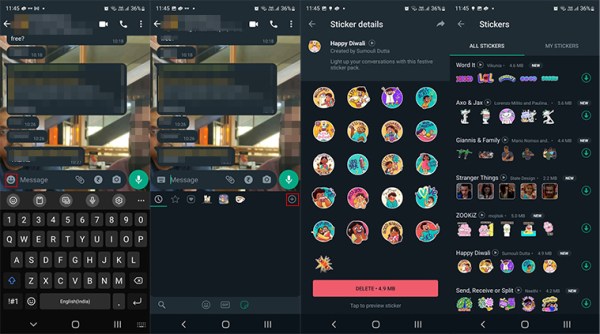


Once you click on the symbol, you will be taken to a screen where you will be greeted by a large list of WhatsApp sticker packs that are available. You can choose a Diwali-themed sticker of your liking from here. We downloaded the “Happy Diwali” sticker pack created by Sumouli Dutta. Once you install the pack, you can use the stickers in a chat like you usually do.
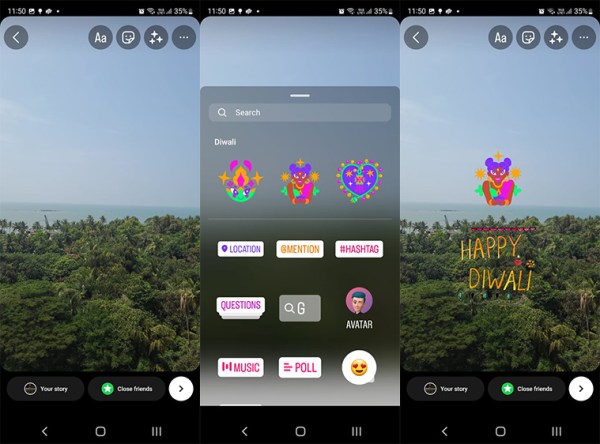
Instagram is offering users three special Diwali-themed stickers that should be available without any downloads. In order to use them, open your Instagram app, open the app and take a picture or use the “Create” option. Once you create a story, click on the stickers icon. At the top of the drawer, you will see three unique Diwali-themed stickers. Select any one of those and add them to your story. You can also add Diwali-themed GIFs from Giphy to add to your story. Once you compose it, send it your friend or add it to your story.

Snapchat’s Chat tab will feature new Diwali-themed Bitmoji and cameo stickers. Also, the camera tab will feature many different festive-themed AR lenses and geo-filters that are created for Diwali celebrations. One of these AR lenses will allow you to use virtual firecrackers, floral decor and diyas in your images.


