Premium
This is an archive article published on September 21, 2017

Apple iOS 11 for iPhone: Six hidden tips and tricks you should know

Apple's iOS 11 is available for download on the iPhone, iPad and iPod Touch. Here are six tips and tricks you need to learn right now. 

Apple, Apple iOS tips and tricks, iOS 11 tips and tricks, iOS 11 iPhone tips and tricks, iOS 11 iPad tips and tricks, tips iOS 11, tricks iOS 11 Apple’s iOS 11 is available for download on the iPhone, iPad and iPod Touch.

Apple’s iOS 11 is available for download on the iPhone, iPad and iPod Touch. The latest mobile operating system takes a giant leap forward, as it promises to bring with it a number of changes and new features. If you’ve already tried the beta, then you’ve probably experienced many of its secret features. The most notable changes are under the hood, probably the reason why you’ve never heard of. Here are six tips and tricks you need to learn right now.
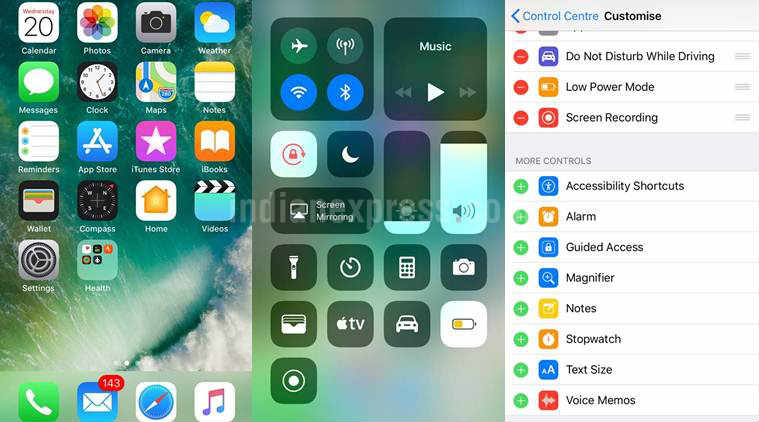
Customise Control  Center 

In iOS 11, the Control Center has been completely revamped. But what is more interesting is that it can be customised fully. To do this, head over to Settings>Control Center and Customise Controls. Plus, you can also add in shortcuts like quick access to notes, Alarm, Low Power Mode,  Apple TV remote, and more.
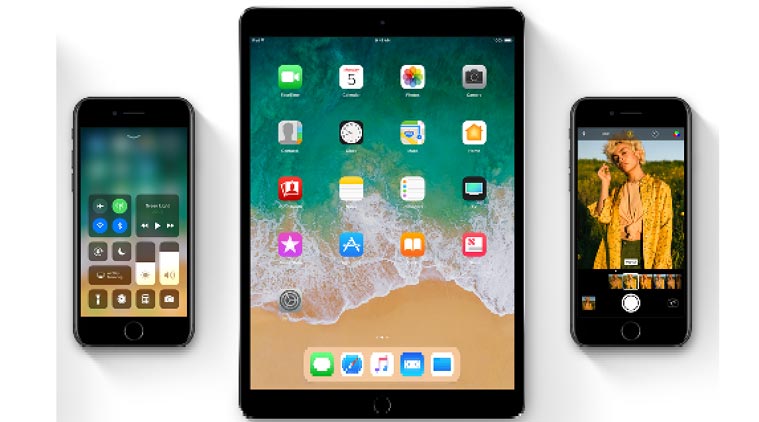
Apple, Apple iOS tips and tricks, iOS 11 tips and tricks, iOS 11 iPhone tips and tricks, iOS 11 iPad tips and tricks, tips iOS 11, tricks iOS 11 In iOS 11, the Control Center has been completely revamped.

Screen recordings 

It’s interesting to note that iOS 11 has a built-in screen recording feature. To activate the feature, head over to the Control Center, tap the Record icon and a 3-second countdown timer appears inside the icon. The feature essentially allows to record what you are doing on the screen. And yes, it will take advantage of your microphone on the device.

Scan QR codes from the camera app

iOS 11 users will be able to scan QR codes using the iPhone’s camera app. It supports a dozen types of QR codes. You can use QR codes to setup HomeKit devices, open websites, and setup routers, among other things. All you need  to open the iPhone’s camera app, point it at a QR code, and upon doing this you will see a popup notification.

Apple, Apple iOS tips and tricks, iOS 11 tips and tricks, iOS 11 iPhone tips and tricks, iOS 11 iPad tips and tricks, tips iOS 11, tricks iOS 11 Make most of the iOS 11 with these tips and tricks.

Share Screenshots quickly 

The ability to take screenshots gets a big boost in iOS 11. So when you take a screenshot, a small preview window appears in the bottom left of the screen. You can then edit and doodle on the screen. When you are done, you can share the edited screenshot via mail, message and other apps.

Do not disturb while driving 

Story continues below this ad

iOS 11 has a feature called Do Not Disturb While Driving. It basically turn off your phone without actually turning it off. So no annoying notifications while driving. However, you can always customise the feature to allow calls, text from your favorite contacts. To turn on the feature, head over to Settings > Do Not Disturb and click Activate Do Not Disturb While Driving.

Turn off Wi-Fi and Bluetooth 

According to a new Apple document support page, toggling off Bluetooth and Wi-Fi in the iOS 11 Control Center does not disable them. Instead, those buttons simply disconnect your iPhone or iPad from connected devices. It means AirDrop, AirPlay and Location Services will still work even if you tap Bluetooth and Wi-Fi off.  Your iPhone or  iPad will continue to work with Apple Watch or Apple Pencil and be able to use Continuity features, like Handoff and Instant Hotspot.

To completely disable Wi-Fi and Bluetooth for all networks and devices, go to Settings>tap on Wi-Fi and turn of Wi-Fi completely. And to completely turn off Bluetooth, simply follow the steps: Go to Settings> tab on Bluetooth and turn off Bluetooth.

Anuj Bhatia is a seasoned personal technology writer at indianexpress.com with a career spanning over a decade. Active in the domain since 2011, he has established himself as a distinct voice in tech journalism, specializing in long-form narratives that bridge the gap between complex innovation and consumer lifestyle. Experience & Career: Anuj has been a key contributor to The Indian Express since late 2016. Prior to his current tenure, he served as a Senior Tech Writer at My Mobile magazine and held a role as a reviewer and tech writer at Gizbot. His professional trajectory reflects a rigorous commitment to technology reporting, backed by a postgraduate degree from Banaras Hindu University. Expertise & Focus Areas: Anuj’s reporting covers the spectrum of personal technology, characterized by a unique blend of modern analysis and historical context. His key focus areas include: Core Technology: Comprehensive coverage of smartphones, personal computers, apps, and lifestyle tech. Deep-Dive Narratives: Specializes in composing longer-form feature articles and explainers that explore the intersection of history, technology, and popular culture. Global & Local Scope: Reports extensively on major international product launches from industry titans like Apple and Google, while simultaneously covering the ecosystem of indie and home-grown tech startups. Niche Interests: A dedicated focus on vintage technology and retro gaming, offering readers a nostalgic yet analytical perspective on the evolution of tech. Authoritativeness & Trust Anuj is a trusted voice in the industry, recognized for his ability to de-jargonize trending topics and provide context to rapid technological advancements. His authority is reinforced by his on-ground presence at major international tech conferences and his nuanced approach to product reviews. By balancing coverage of the world's most valuable tech brands with emerging startups, he offers a holistic and objective view of the global technology landscape. Find all stories by Anuj Bhatia here. You can find Anuj on Linkedin. ... Read More


Latest Comment
Post Comment
Read Comments
Advertisement
Loading Taboola...
Advertisement