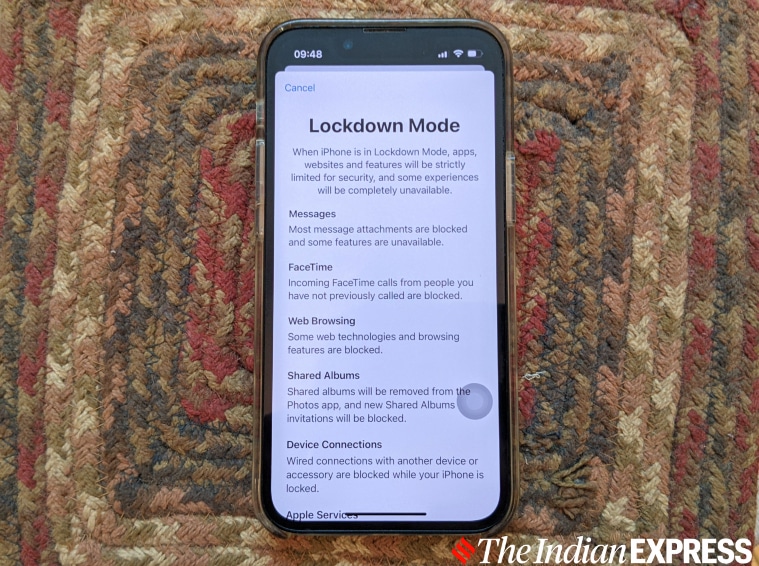
Lockdown mode, which is now available with iOS 16, isn't for everyone. (Image credit: Anuj Bhatia/Indian Express)
Apple began rolling out the latest iOS 16 software update to millions of iPhones last week coinciding with the worldwide availability of the iPhone 14 series. iOS 16 brings with it a number of fresh features such as an interactive lock screen and the ability to edit and unsend recently sent iMessages. But, while many of the new features introduced with iOS 16 aren’t specific to users, the new security feature called “Lockdown” mode offers additional protection to Apple device owners who may be at risk from targeted cyberattacks. But what is the new lockdown mode on the iPhone and what does it do to protect users from cyberespionage tools like Pegasus? We explain Apple’s new iOS 16 security feature.
For years, Apple has marketed its iPhones as the most secured devices on the planet – and it continues to do so. But last year a consortium of journalists published The Pegasus Project, which showed over 30,000 human rights activists, journalists and lawyers across the world, including in India, may have been targeted by Israel-based NSO group’s spyware Pegasus.
You’ve Read Your Free Stories For Now
Sign up and keep reading more stories that matter to you.
The malware did not spare iPhones either and attacked users through a variety of exploits, including several iOS zero-click zero-days. Pegasus allows users to remotely extract a phone’s contents, tap into the camera and microphone and access calls, location information, photographs and messages without their knowledge – and without a victim even clicking on a link.
In September, though, Apple did fix a security hole that Pegasus exploited for installation on iPhones. In November, the United States took strict action by blacklisting the NSO Group, the Israeli company that created Pegasus.
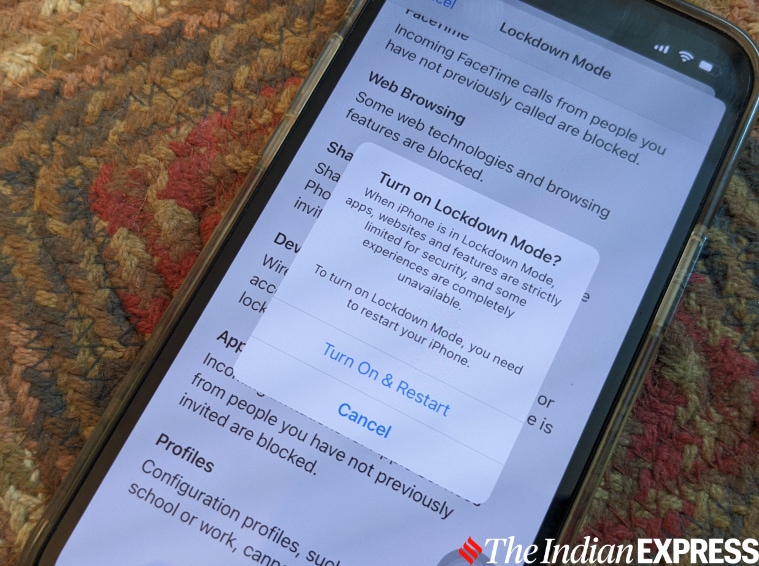
Apple’s new Lockdown mode. (Image credit: Anuj Bhatia/Indian Express)
This was followed by a lawsuit filed by Apple against the makers of Pegasus, accusing the NSO Group of “flagrant violations of US federal and state law,” on grounds related to the damage caused by spyware on Apple devices.
Earlier this year, a new report claimed that Pegasus was used to hack the iPhone of a Jordanian journalist in December. The hack occurred several weeks after Apple filed a suit against the Israeli company in a bid to attack its customers.
The Pegasus probe shows that iPhones —or any other ‘connected’ device – are not 100 per cent secure and can potentially be hacked.
Story continues below this ad
What is Lockdown mode?
While Apple still continues to battle against the NSO Group in courts, the company announced a new “lockdown” mode feature as part of the iOS 16 operating system at the Worldwide Developers Conference (WWDC) in June.
Lockdown mode, which is now available with iOS 16 and launching on iPads and Macs later this year, is a security feature which offers an additional layer of security to users who are at risk of being targeted by Pegasus and other sophisticated advanced spyware. Apple calls Lockdown “extreme” and when enabled many of the iPhone features get disabled – a trade-off for such a security feature.
For example, when users temporarily enable Lockdown mode on their phones, it switches off link previews in text messages, which hides a person’s anonymity by obtaining their IP addresses. The feature doesn’t block a link, just the preview, so users can still copy and paste the web address into their browser. Lockdown mode also disables certain features in Safari that might affect some websites.
Certain complex web technologies in your browser, like web-based fonts and just-in-time compilers that help websites load faster, might not render properly or might not load at all. You will notice that when Lockdown mode is turned on, you can’t receive FaceTime calls from contacts if the user has not previously sent the initiator a call or request. You also won’t receive Apple service invitations, like calendars and notes, from those people you haven’t communicated with before while Lockdown Mode is enabled.
Story continues below this ad
If you are at risk of a spyware attack as a journalist or a politician—it’s worth enabling Lockdown Mode on your iPhone. (Image credit: Anuj Bhatia/Indian Express)
How to enable Lockdown mode?
If users think they can be a victim of a spyware attack, they can enable Lockdown Mode on their iPhone running iOS 16, which is rolling out and is free to download. Lockdown mode is located in the Privacy and Security section of the Settings app. Once users select Lockdown Mode, their iPhone will restart and certain functionalities will be unavailable. If you go into Safari, you should see a Lockdown Enabled at the top of the page, indicating that Lockdown Mode is turned on. Since this option is a temporary way to turn off the functionalities of the iPhone that can be abused by hackers, you can switch off Lockdown Mode through the Settings menu, if you wish to do so.
NSO Group’s Pegasus spyware was used to secretly target the smartphones of those close to Jamal Khashoggi, the journalist who was murdered in 2018. (Image credit: Reuters)
Who should enable Lockdown Mode?
The average person does not really have to worry about someone breaking into their phone and listening to their conversations or surveilling them through their phone cameras. Which is why Lockdown Mode isn’t for everyone. But for journalists, human rights activists, politicians, lawyers and high-ranking officials, Lockdown Mode can make it tough for attackers or spyware makers to hack into an iPhone. While Lockdown Mode is far from fool-proof, it’s a good sign that companies like Apple are taking steps to beef-up security on their devices and protect against malware threats.
Anuj Bhatia is a seasoned personal technology writer at indianexpress.com with a career spanning over a decade. Active in the domain since 2011, he has established himself as a distinct voice in tech journalism, specializing in long-form narratives that bridge the gap between complex innovation and consumer lifestyle.
Experience & Career: Anuj has been a key contributor to The Indian Express since late 2016. Prior to his current tenure, he served as a Senior Tech Writer at My Mobile magazine and held a role as a reviewer and tech writer at Gizbot. His professional trajectory reflects a rigorous commitment to technology reporting, backed by a postgraduate degree from Banaras Hindu University.
Expertise & Focus Areas: Anuj’s reporting covers the spectrum of personal technology, characterized by a unique blend of modern analysis and historical context. His key focus areas include:
Core Technology: Comprehensive coverage of smartphones, personal computers, apps, and lifestyle tech.
Deep-Dive Narratives: Specializes in composing longer-form feature articles and explainers that explore the intersection of history, technology, and popular culture.
Global & Local Scope: Reports extensively on major international product launches from industry titans like Apple and Google, while simultaneously covering the ecosystem of indie and home-grown tech startups.
Niche Interests: A dedicated focus on vintage technology and retro gaming, offering readers a nostalgic yet analytical perspective on the evolution of tech.
Authoritativeness & Trust
Anuj is a trusted voice in the industry, recognized for his ability to de-jargonize trending topics and provide context to rapid technological advancements. His authority is reinforced by his on-ground presence at major international tech conferences and his nuanced approach to product reviews. By balancing coverage of the world's most valuable tech brands with emerging startups, he offers a holistic and objective view of the global technology landscape.
Find all stories by Anuj Bhatia here.
You can find Anuj on Linkedin. ... Read More