2 min read
© IE Online Media Services Pvt Ltd



 Instagram lets users check the devices they are logged in to from a single window. (Image Source: Pixabay)
 If you think someone has unauthorized access to your account or that it has been hacked, Instagram lets you see which devices are currently logged in to your account. The tool can also be used to remove logins from phones and PCs you have stopped using or no longer have access to. Here’s how you can quickly revoke access to suspicious devices and secure your Instagram account.
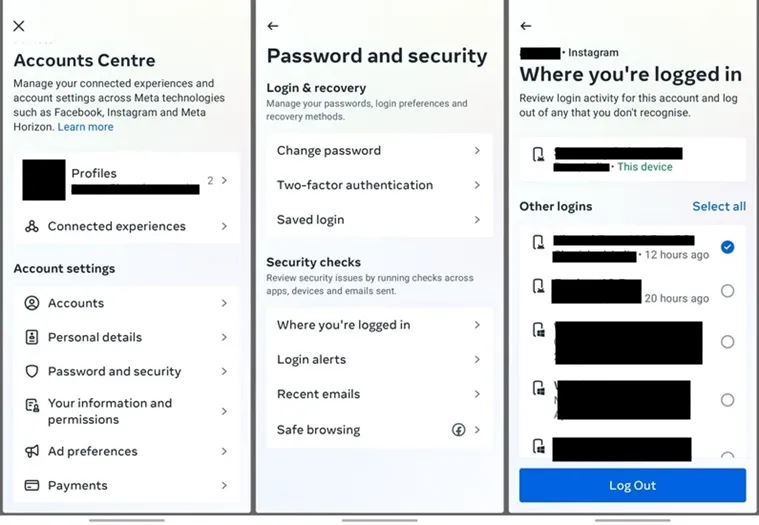 Instagram lets users log out from all devices or remove selected ones. (Express Photo)
To see the list of devices logged in to your Instagram, open the app and head over to your profile by tapping on the circle icon on the bottom right of the screen.
Now, tap on the three-line menu on the top right and head over to ‘Security and privacy’. Here you will see Meta’s new ‘Accounts Center’, clicking on which will take you to a new screen.
Under the ‘Account Settings’ pane, tap on ‘Password and security’. On the page that appears, you will see an option named ‘Where you’re logged in’, tapping on which will show you the accounts you can check for suspicious logins.
Tap on your Instagram profile here and you will see a list of devices where your account is logged in along with their physical location. If you think someone else has gained access to your account, choose the ones you want to remove and click on the ‘Logout’ button.
In case you are using Instagram from your web browser, head over to accountscenter.instagram.com and follow from step three. Instagram also shows unrecognized logins from devices on the ‘Where you’re logged in’ page, so make sure you check it out.