© IE Online Media Services Pvt Ltd
 2 min read


 The ability to use animated emojis as profile photos was introduced earlier this year. (Image Source: Telegram)
 Earlier this year, Telegram developers introduced several new features like the ability to translate entire chats, categories for emojis, granular media permissions, set animated emojis as profile pictures and more. If you are tired of your current Telegram profile photo and want to use an animated emoji, here’s a step-by-step guide on how to do the same.
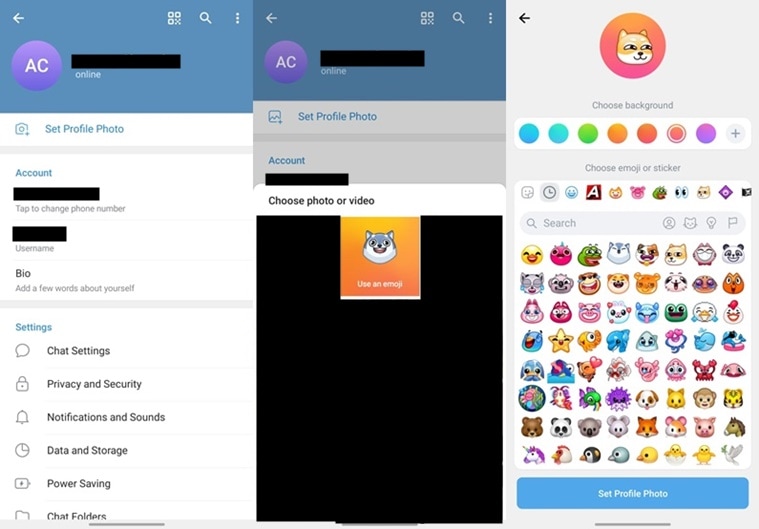 Here’s you can quickly use an animated emoji as your Telegram profile photo. (Express Photo)
Open the Telegram app on your device and tap on the three-bar menu on the top left of the screen.
Now, head over to the ‘Settings’ page and click on the ‘Set Profile Photo’ option. Here, you will find an option that says use ‘Use an emoji’. Tap on it and you will be taken to a new page with a lot of emojis and stickers.
There are hundreds of emojis available, so finding one might take a while. Choose the emoji or sticker of your choice along with the background colour. Telegram also lets users choose the background colour of their choice if they don’t like the presets.
Once done, tap on ‘Set Profile Photo’ and you are good to go. Now, all your Telegram will see an animated emoji as your profile picture.