2 min read
© IE Online Media Services Pvt Ltd



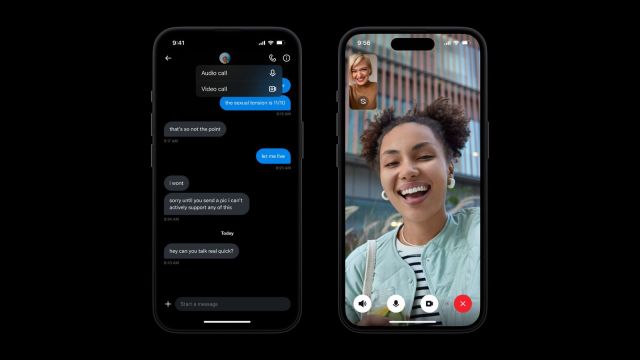 Elon Musk wants to turn X into an everything app. (Image Source: Twitter)
 X, formerly Twitter, has officially started rolling out audio and video calling capabilities. Elon Musk recently shared a post on the platform hinting the feature will be soon available to everyone
Earlier in August this year, company CEO Linda Yaccarino confirmed that users on the social media platform will soon get native calling capabilities, allowing users to make video or audio calls without sharing phone numbers.
During an interaction with CNBC, Yaccarino said that the functionality will be available within the ‘Direct Message’ (DM) menu and that the platform will implement certain restrictions to prevent users from getting spam calls.
Early version of video & audio calling on 𝕏 https://t.co/aFI3VujLMh
— Elon Musk (@elonmusk) October 25, 2023
To enable audio and video calls on X, head over to the app settings, tap on ‘Privacy and Safety’ and click on ‘Direct Messages’. If the feature is available on your account, you will see a toggle named ‘Enable audio and video calling’. Turn it on and you are good to go.
X is also offering a bunch of customisation options that let users decide who they can receive calls from. You can choose if you want to receive calls from ‘People in your address book’, ‘People you follow’, or ‘Verified users’.
Similar to WhatsApp and Instagram, the call button appears in the top right corner when you are engaged in a conversation with another user on the platform.
Ever since Elon Musk took over X (formerly Twitter), the billionaire has been working to turn the social media platform into an all-encompassing app, which will offer features beyond micro-blogging.