3 min read
© IE Online Media Services Pvt Ltd




There are real concerns over how Twitter will function following Elon Musk’s acquisition and the chaos that has ensued since. If you are an avid Twitter user, chances are you’ve accumulated hundreds of tweets over the years. To ensure privacy and to keep people acquainted only with the ‘current you,’ you’d want to delete your older tweets. Semiphemeral is a tool that comes in really handy for that by letting you delete posts automatically up to a certain period. We’ve detailed how you can use it below.
Opening Semiphemeral’s website will show you a “Login with Twitter link” right at the top. Tap that and you’ll have to grant the web app authorisation to your Twitter account to let it handle tweets. When that’s done, you’ll be redirected to the web app’s dashboard.
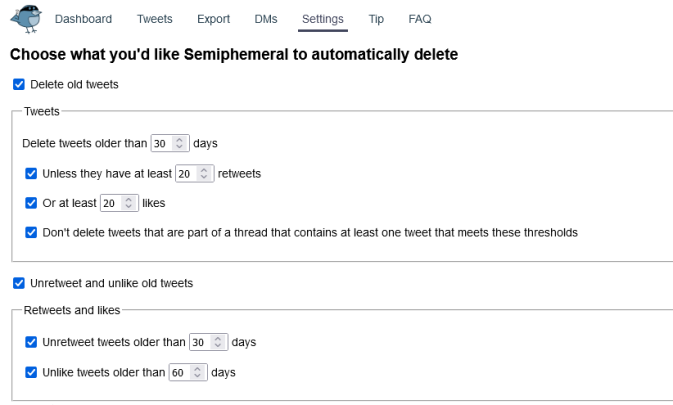 Semiphemeral comes in really handy by letting you delete posts automatically up to a certain period.
You can use Semiphemeral to:
1. Delete all old tweets based on a set threshold
2. Set exceptions to exclude from automatic deletion
3. Unretweet tweets after a number of days
4. Unlike tweets after a number of days
5. Automatically delete your old direct messages
Once logged in, navigate to Settings to choose what to delete. Here, you’ll have to check the “Delete old tweets” check box to get started. Under that section, you can choose to let Semiphemeral delete tweets older than a specific date. But you can set exceptions for popular tweets or those that are a part of a thread.
The second section – “Unretweet and unlike old tweets” – is pretty self-explanatory and will let you remove retweets and unlike tweets older than a specified time. This feature comes handy for people who are bothered about navigating to the “Likes” tab on their profile and seeing all the posts they’ve interacted with.
Finally, at the bottom of the Settings page, you will see an option to also delete your DMs after a specified time. You will have to grant authorisation to Semiphemeral once again for that, though.
Keep in mind that once you’ve set everything up, Semiphemeral will remain active and continue deleting tweets based on your settings. To change that you could either scroll to the bottom of the Settings page on the web app to “Delete my Semiphemeral account.”
Or you could revoke authorisation by opening up the Twitter app and navigating to its Settings then Security and account access > Apps and sessions > Connected apps > Semiphemeral.com > Revoke app permissions.