2 min read
© IE Online Media Services Pvt Ltd



 Google is the world's most popular search engine. (File photo)
Since the early 2000s, Google has been redefining the way we look for information on the internet. The tech giant accounts for almost 90 per cent of the search engine traffic, offering personalised search results for users. This is quite helpful for most users, but sometimes you may want to see generalised search results. It can also be handy for individuals or researchers looking for an unbiased search experience or shoppers who want to compare products.
Now, the search giant is adding a new button at the bottom called “Try without personalisation” of the search results page, clicking on which will show you search results you would normally see in incognito mode or when you haven’t logged in to Google.
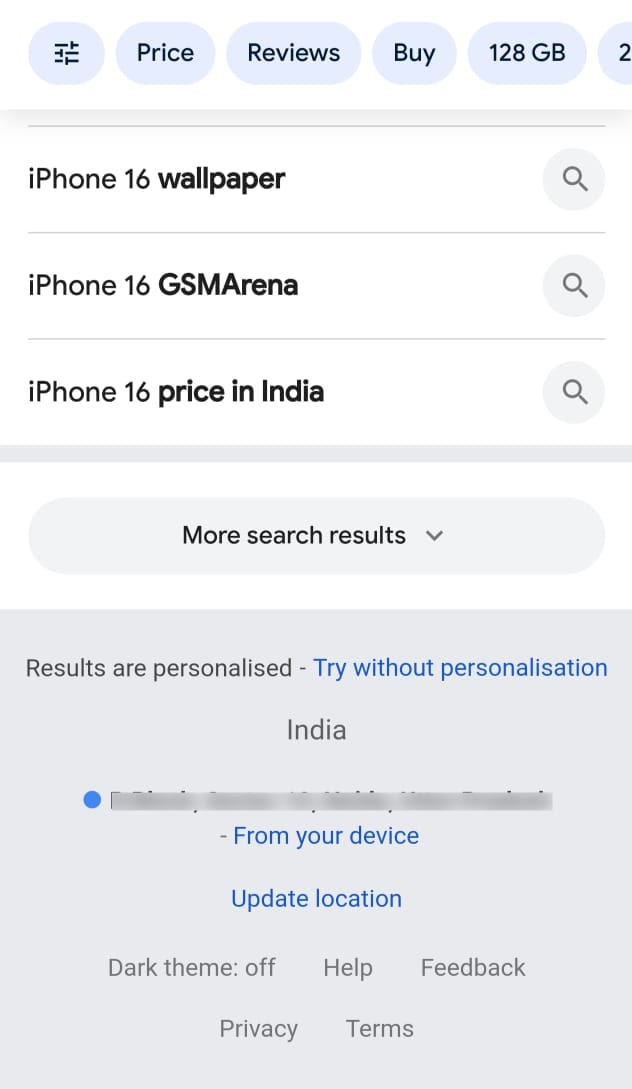 The new button appears at the bottom of the Google search results page. (Express Photo)
In a statement to The Verge, Google spokesperson Ned Adriance said “This change makes it easier for people to get an accurate understanding of whether their results have been personalized, while also providing them with the opportunity to explore non-personalized results.” The publication also noted that the option to turn off personalised search results appeared more on their smartphone than the desktop version. Also, this link may not be visible for all search queries.
For those unaware, the feature was previously hidden in the “About this result” button section of individual search results. The new button also gives users the option to temporarily view results without personalisation without permanently changing their search settings. While users can also disable personalised results from account settings, they had to add the “&pws=0” parameter at the end of the Google search URL.