


© IE Online Media Services Pvt Ltd
Tags:


Instagram has added an extra layer of security to its platform by adding two-factor authentication, which is now live for everyone. The feature requires users to enter a code every time they log in to their account. It can be activated by clicking on the gear icon in Instagram account and then switching on the Two-Factor Authentication.
“Last September, we made a commitment to the community to keep Instagram a safe place for everyone and built tools to safeguard self-expression on our platform. This year we will continue to act on that commitment and also focus on fostering kindness,” Kevin Systrom Co-founder & CEO, Instagram, said in a blog post.


Further, Instagram has developed an additional site where users can learn about keeping themselves safe on the platform. It will give users an access to tools such as account blocking, comment controls, photo tagging and more. Instagram enables users to connect with support services in their country to know more about its services.
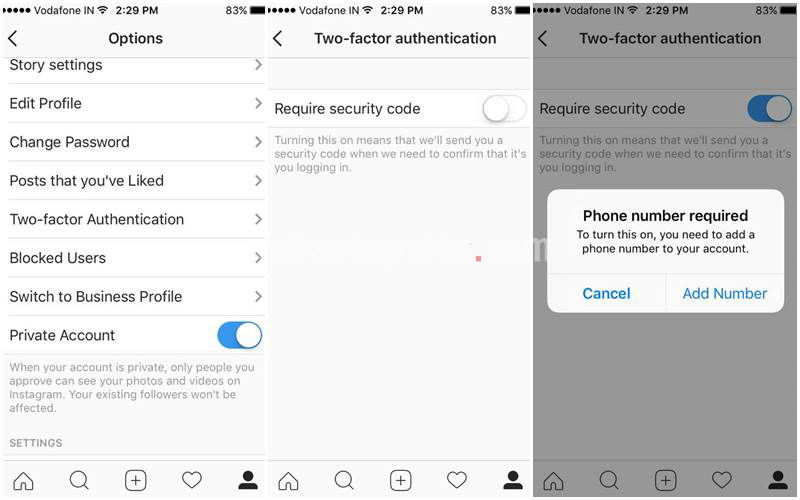
To activate two-factor authentication in Instagram, click on gear icon on top right on your profile. Next, tap on two-factor authentication and enable ‘Require security code’ option. The app will now ask to add a phone number to your account. After, you’ve added your phone number, you’ll get a security code each time you log in to your Instagram account.
We’d recommend enabling two-factor authentication to Instagram and other accounts, which offer the feature. It helps reduces the risk of hacking as account can only be logged in after you enter the security code sent on your added phone number. Google’s Gmail, and WhatsApp already offer two-factor authentication.


