© IE Online Media Services Pvt Ltd
 3 min read


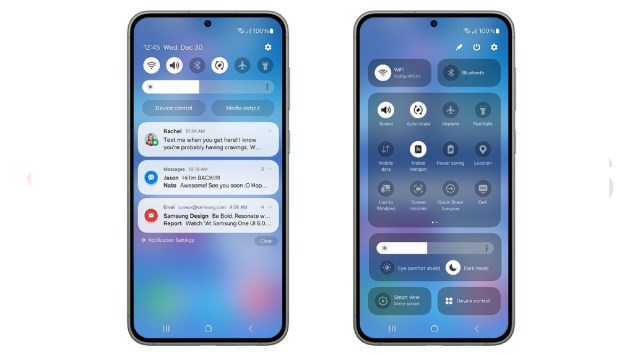 New quick settings panel on OneUI 6 (Image credit: Samsung)
 Samsung recently released its first beta of OneUI 6 based on Android 14 for the Galaxy S23 series of smartphones. With this major update, Samsung has revamped a few fundamentals to give OneUI 6 a fresh look and has also included additional features and capabilities.
OneUI 6 update is currently available in US, Korea, and Germany for the Samsung Galaxy S23 Ultra, Galaxy S23+, and Galaxy S23. In the coming days, the company is likely to add more devices and more markets to OneUI 6 beta access.
Here are some of the prominent new features available on the Android 14-based OneUI 6 from Samsung.
Samsung’s OneUI 6 introduces a brand new quick settings menu, which is now bolder and offers easier access to some of the most used quick toggles like Wi-Fi, Bluetooth, and a new display control option, which includes dark mode toggle, eye comfort shield, and a brightness bar.
Unlike most custom Android OSes, where, swiping from the top right opens quick toggles and swiping from the top left opens notifications, the OneUI 6, just like the previous iteration has a unified panel for both quick settings and notifications.
OneUI 6 now allows users to edit the top and full quick settings separately. On top of that, Samsung has also introduced new media players, which show the media progress bar in a wavy pattern.
New system font, emojis
Samsung has also revamped the emoji style on OneUI 6 and has also introduced a new system front. Samsung’s emojis now look a bit more modern, uniform and definitely look a lot better than the emojis on OneUI 5.
New lock screen customisation features
Samsung now supports more clock styles that can be resized. Although these are not as drastically unique as the one found on stock Android 14, the new lock screen customisation features definitely offer more function to users.
Camera widget
Samsung has introduced a new camera widget option, where, a user can create a shortcut for a specific camera sensor (wide/ultra-wide/telephoto) along with an option to choose the mode such as photo, portrait, videos, night mode, and more. This camera widget gives users quick access to their favourite camera feature in a single click.