4 min read
© IE Online Media Services Pvt Ltd



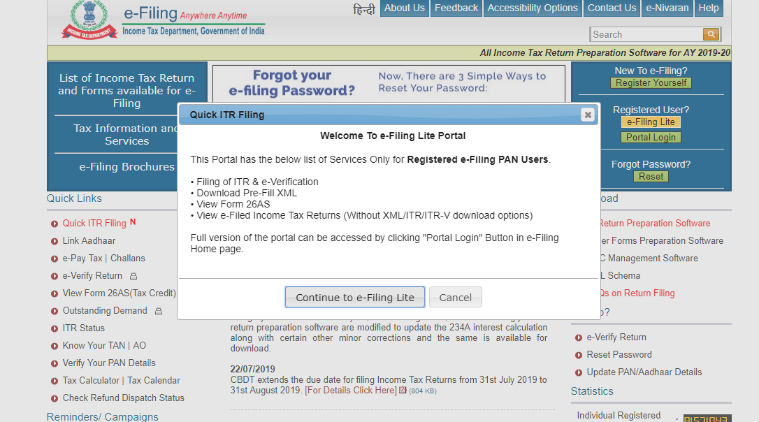 ITR e-Filing Online 2019: The home page has a new ‘Quick ITR Filing’ link that users can click on to continue to ‘e-Filing Lite’.
Income Tax Return (ITR) e-Filing Online 2019-20: The Income Tax department has launched its ‘lite’ e-filing facility, which is a lighter version of e-Filing portal to help taxpayers file returns quickly. The move comes a week after the government extended the due date for filing income tax returns by individuals for the financial year 2018-19 till August 31.
The ‘e-Filing Lite’ facility is live on the official portal of the department. The home page has a new ‘Quick ITR Filing’ link that users can click on to continue to ‘e-Filing Lite’, which offers services only for registered e-Filing PAN users.
The services include filing of ITR and e-Verification, download pre-Fill XML and view e-Filed Income Tax Returns. The XML, ITR, ITR-V download options will not be available for Lite users. All the services can be accessed by clicking on the ‘Portal Login’ button. Those who wish to file their income tax return using the new ‘e-Filing Lite’ option, here’s how you can do it:
• Open the income tax India e-filing home page at https://www.incometaxindiaefiling.gov.in.
• Click on the new ‘Quick ITR Filing’ link, which should show up on the left under the ‘Quick Links’ menu.
• A pop-up describing the services that can be accessed in the ‘Lite’ version will show up. Click on ‘Continue to e-Filing Lite’ to continue.
• Users who are already registered will need to enter their PAN card number, password and captcha code. Those who are not can click on the register option on the top right to continue.
• Click on “Income Tax Return” option in the ‘e-File’ menu
• The page will require users to fill in details like the assessment year for which they want to file ITR, ITR form name. PAN number, date of birth, etc will be pre-filled.
• To continue, verify with either digital signature certificate or Aadhaar OTP (if it is linked with PAN), or select from more methods best suited.
• Read the instructions and click on the arrow to go to the next section.
• The “Part A General Information” tab will need users to fill in details such as type of return, employer category, return filed, etc. When finished, click on ‘Save Draft’ and then ‘Next’.
• Next, fill in details in the “Computation of Income and Tax” tab and click on ‘Save draft’ and then ‘Next’ when done.
• The next tab should be “Tax Details” where a user is required to fill in information related to TDS. Once again, click on “Save Draft” and then Next.
• In the “Taxes Paid and Verification” tab, fill in details like total tax paid, bank accounts held in India. Verify pre-filled personal details, click on “Save Draft” and then ‘Next’.
• The next is the “80G” tab. After finished with filling in details, click on “Save Draft” followed by “Preview & Submit”.
• A pop-up asking whether to preview the filled form or go back and make changes will appear. Choose the appropriate option.
• The filled form can also be downloaded as Preview PDF. If the details are fine, finally click on “Submit” following which a pop-up will again appear to confirm. Or else, tap on “Edit” to make changes to the form and then submit.