


© IE Online Media Services Pvt Ltd
Tags:



WhatsApp is rolling out a new free web extension browser called ‘Code Verify’. The extension–which will be available for Google Chrome, Microsoft Edge and Firefox browsers– is designed for users to verify the authenticity of the WhatsApp web code being served to the browser.
WhatsApp says running the extension will give privacy-conscious users more security and peace of mind that the web version of the app has not been altered. It has also partnered with Cloudfare for the same to enable the deployment of the browser extension at scale.


” id = “6415944” liveblog = “no” ]
Given this shift in usage, the company is adding security tools for ensuring that WhatsApp Web is secure. The company has also listed reasons on why it needs to do this with the web version in particular. The mobile app is verified and vetted by third-party app stores, but the same does not happen for WhatsApp Web. This along with other factors, “could weaken the security of a web browser that don’t exist in the mobile app space, such as browser extensions,” the company said.
This is an open-source web browser extension that can be added to FireFox, Microsoft Edge and Google Chrome browser. WhatApp says it will automatically be pinned to Firefox or Edge browsers once added, and Chrome users will need to pin it for optimal use. The feature works in partnership with Cloudflare, a web infrastructure and security company. It is also being offered as open-source so that other services can use it as well.
The browser extension “doesn’t log any data, metadata, or user data, and it does not share any information with WhatsApp,” according to the company, nor does it read or access messages sent or received by the user. Further, neither WhatsApp nor Meta will know whether or if someone has downloaded the Code Verify extension.
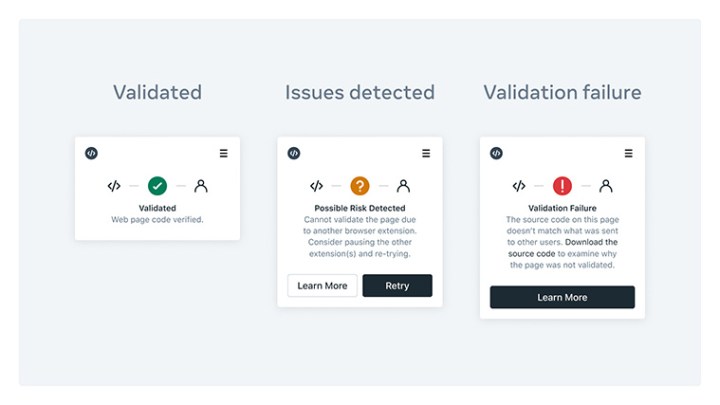
WhatsApp is comparing the browser extension to a traffic light. After a user installs the extension, it will run automatically when one goes to WhatsApp Web and”act as real-time alert system.” According to the company, here’s what will show when you use the extension:
If the WhatsApp code is fully validated, the Code Verify icon in the browser will appear green.
If the Code Verify icon appears orange, it means that the user need to refresh your page or another browser extension is interfering with Code Verify. In this instance, Code Verify will recommend that you pause your other browser extensions.
If the Code Verify icon appears red, it will indicate that there is a possible security issue with the WhatsApp Web code you’re being served.
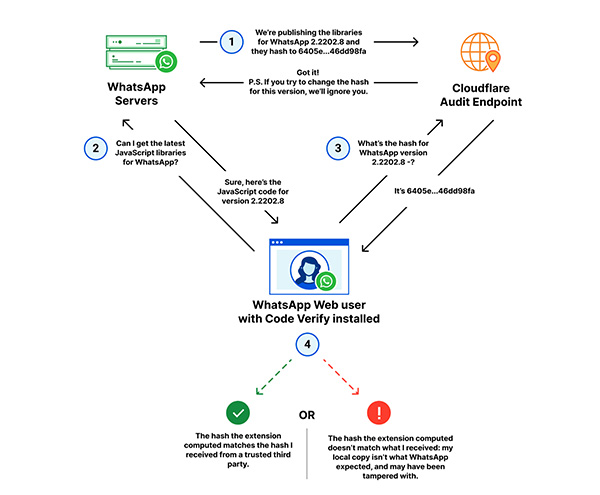
Code Verify works in partnership with Cloudflare and will check the resources on the entire webpage. According to the post, Cloudflare has a “cryptographic hash source of truth for WhatsApp Web’s JavaScript code.” So when someone runs the extension, it compares the code that runs on WhatsApp Web against the version of the code verified by WhatsApp and published on Cloudflare. In case of any discrepancies, the user is notified.
When the code is updated for WhatsApp Web, it will be done for Code Verify as well to ensure continuity.


