


© IE Online Media Services Pvt Ltd
Tags:


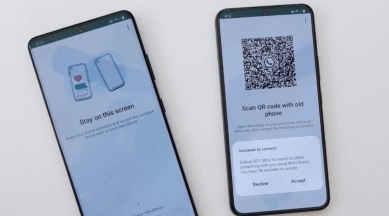
Meta CEO Mark Zuckerberg has unveiled a new feature that allows you to move your WhatsApp chats between devices without uploading them to the cloud.
Instead of backing up and restoring your chats via Google Drive, you can now scan a QR code on one phone and initiate a direct transfer to another running the same operating system. Essentially, this means that with this update, users will be able to transfer chats without the data ever leaving the two devices — and without ever exiting WhatsApp.

Meta asserts that this method is not only more private than cloud services but is faster as well, particularly when it comes to the transfer of large media. The new method covers both chats and media history, ensuring nothing is lost in the transfer. Data is fully encrypted during the process too.
1. To start, make sure both your devices are physically with you, are connected to Wi-Fi, and have location enabled.
2. Then, on your old phone, go to Settings > Chats > Chat transfer and scan the QR code.
3. The transfer will begin right away.


