2 min read
© IE Online Media Services Pvt Ltd



 The feature is now available to everyone.(Image Source: WhatsApp)
WhatsApp recently updated its message pinning feature, allowing users to pin up to 3 messages in a conversation. Spotted last week in a beta version of the app, the Meta-owned platform previously let users pin a single message.
Apart from text, Meta says users will be able to pin messages like media, voice notes and emojis as well. WhatsApp says the feature is available in both individual as well as group chats.
The app also lets you choose whether you want to pin the message for 24 hours, 7 days or 30 days with Meta saying that by default, a message will be pinned for 7 days.
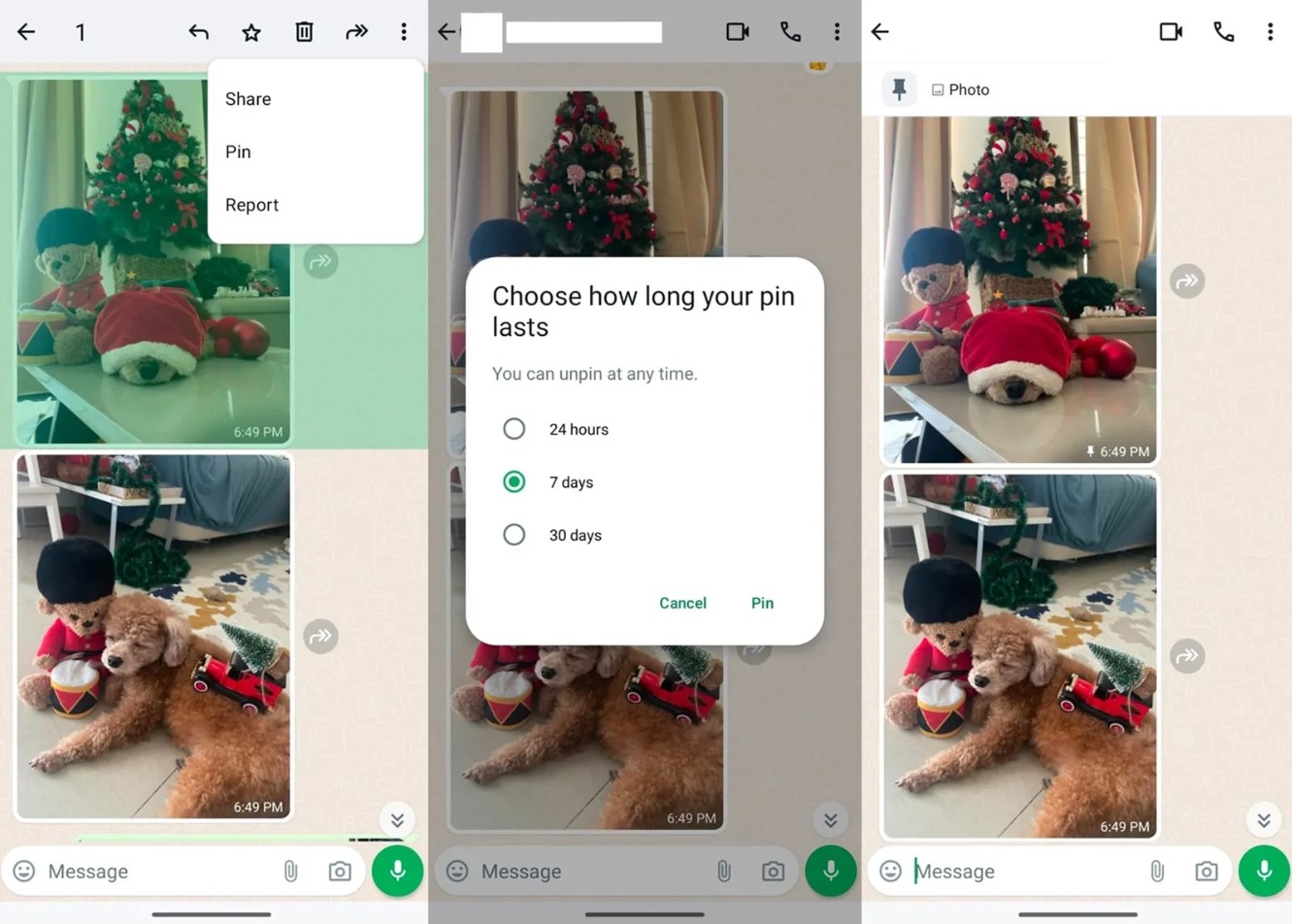 Here’s how to pin a message in chat on WhatsApp. (Express Photo)
If you want to unpin a message, long-press the message and select the ‘Unpin’ option from the three-dot menu. On Apple devices, swipe right on the message and you will see the Pin button.
While the update should help improve the overall user experience, the functionality feels limiting compared to Telegram, which allows people to pin multiple messages.
In the last few months, WhatsApp has been working on several new features like the ability to read voice messages on Android, a chat filtering option and a new way to search old messages by date to name a few