This is an archive article published on February 7, 2018
Google Motion Stills app gets updated with ‘AR Mode’: Here’s how to use it
Google has updated its Motion Stills app to add support for AR stickers. Here's a quick look at how to use an 'AR Mode' to place AR stickers in your photos.
New Delhi | Updated: February 7, 2018 12:12 PM IST
3 min read
Whatsapp
twitter
Facebook
Reddit
Google has updated its Motion Stills app to add support for AR stickers. Here’s how to use it on any Android smartphone.
Google is bringing AR stickers to any Android smartphone. Motion Stills app is now being updated to v2.0, and it comes with the ability to add a handful of AR characters into the photos. It works with almost any Android smartphone, as long as it runs on Android 5.1 or later and has a gyroscope and an accelerometer. Motion Still app is available on the Google Play Store for free. The feature was first introduced on the Pixel 2 last year when the company released a pack of Star Wars and Stranger Things themed stickers, allowing users to add characters from the show to the photos and videos.
Now that Google has updated its Motion Stills app to add support for AR stickers, here’s a quick look at how to use an ‘AR Mode’ to place AR stickers in your photos.
Download Motion Stills
First things first, you need to download the Motion Stills app from the Google Play store. If you are already using it, make sure you update the latest v2.0 of the app. Google’s Motion Stills app will work on almost smartphone running Android 5.1 and up.
How to place AR stickers
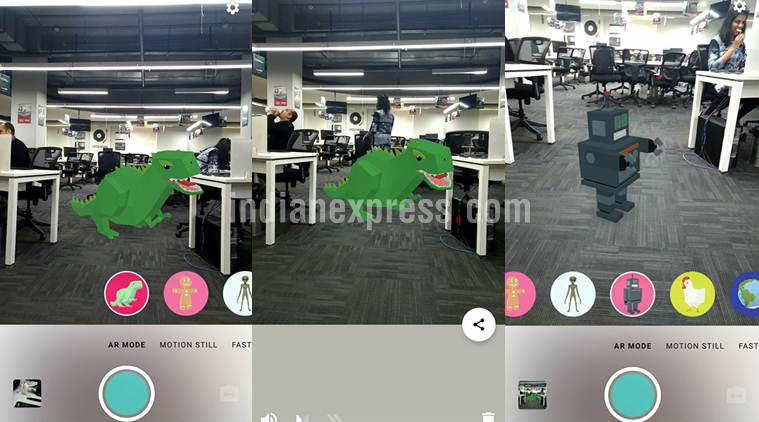
Adding AR stickers in Motion Stills is straightforward. Fire up the app, tap on AR, and then select AR character you want to add in your photo. As far as the choice of AR objects is concerned, there aren’t many options available at the moment. You’re are currently limited to Dinosaur, Gingerbread, Alien, Robot, Chicken, and Globe. Once you choose an appropriate AR character of choice, the app will ask you to select a surface for the character to be placed onto. You can resize the size or orientation of the character by using two fingers. Now tap on the recording button to capture the footage. Once you’re done, tap on the same button to save the video.
Edit the footage and share it
It is possible to edit the captured footage and share it. To do that, tap on the gallery box on the lower corner and now choose the footage you wish to edit. If you want to turn the background sound on or off, it can be done by tapping on the speaker icon. Plus, it is possible to change the clip’s playback speed. Once the clip is edited, select the share button the right-hand side of the screen. The clip can be shared as a GIF or a video. If you don’t want to keep the recorded clip, simply delete it by selecting the trash icon in the lower right corner.
Anuj Bhatia is a seasoned personal technology writer at indianexpress.com with a career spanning over a decade. Active in the domain since 2011, he has established himself as a distinct voice in tech journalism, specializing in long-form narratives that bridge the gap between complex innovation and consumer lifestyle.
Experience & Career: Anuj has been a key contributor to The Indian Express since late 2016. Prior to his current tenure, he served as a Senior Tech Writer at My Mobile magazine and held a role as a reviewer and tech writer at Gizbot. His professional trajectory reflects a rigorous commitment to technology reporting, backed by a postgraduate degree from Banaras Hindu University.
Expertise & Focus Areas: Anuj’s reporting covers the spectrum of personal technology, characterized by a unique blend of modern analysis and historical context. His key focus areas include:
Core Technology: Comprehensive coverage of smartphones, personal computers, apps, and lifestyle tech.
Deep-Dive Narratives: Specializes in composing longer-form feature articles and explainers that explore the intersection of history, technology, and popular culture.
Global & Local Scope: Reports extensively on major international product launches from industry titans like Apple and Google, while simultaneously covering the ecosystem of indie and home-grown tech startups.
Niche Interests: A dedicated focus on vintage technology and retro gaming, offering readers a nostalgic yet analytical perspective on the evolution of tech.
Authoritativeness & Trust
Anuj is a trusted voice in the industry, recognized for his ability to de-jargonize trending topics and provide context to rapid technological advancements. His authority is reinforced by his on-ground presence at major international tech conferences and his nuanced approach to product reviews. By balancing coverage of the world's most valuable tech brands with emerging startups, he offers a holistic and objective view of the global technology landscape.
Find all stories by Anuj Bhatia here.
You can find Anuj on Linkedin. ... Read More


 3 min read


 Google has updated its Motion Stills app to add support for AR stickers. Here’s how to use it on any Android smartphone.