


© IE Online Media Services Pvt Ltd
Tags:


While text is obviously the most important part of any document, there are several other invisible elements that go with it, helping enhance readability or improving the general structure. These invisible elements are typically in the form of non-printable characters such as line breaks and spaces, without which a document looks like nothing but a characterless blob of text. Unfortunately, because they’re invisible, tracking such elements can get difficult. Fixing this hassle on Google Docs is a new update that displays non-printing characters so that you can easily tell how a document is laid out.
Turning the feature on is easy – simply navigate over to the Google Docs toolbar, select “View,” and hit “Show non-printing characters.” To toggle it off, repeat this process.

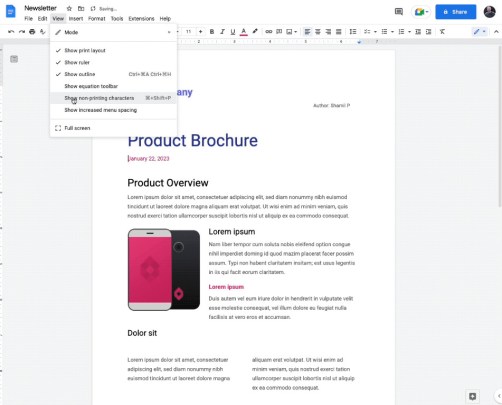
When non-printing characters are shown, they’ll be represented with symbols and text. You’ll be able to tell the following elements when “Show non-printing characters” is toggled on:
Google Docs users previously had to rely on third-party plugins to view these characters. The new update now eliminates the need for those, helping you make appropriate edits much easier.
The feature hasn’t been released widely as of yet, with Google saying that it’s being rolled out gradually, starting January 9, and may take up to 15 days to show for you. While writing about the development, we could not spot the feature. It isn’t tied to any subscription – all Google Docs users will be able to use this feature.
Alongside the aforementioned, Google is also rolling out improvements to voice features in Google Docs and Slides. “These enhancements will help reduce transcription errors and minimize lost audio during transcription,” according to the company.


