2 min read
© IE Online Media Services Pvt Ltd



 Reddit is popular for its ‘subreddit’ where people discuss varied subjects and the company depends on advertising for its revenue. (Image Source: Reuters)
 Passkeys may be the future of passwords, but two-factor authentication is currently one of the most secure and handy ways of securing social media accounts. While most platforms allow users to set up and enable two-factor authentication (2FA) from both mobile apps and websites, some like Reddit have limited the functionality to web browsers on desktop.
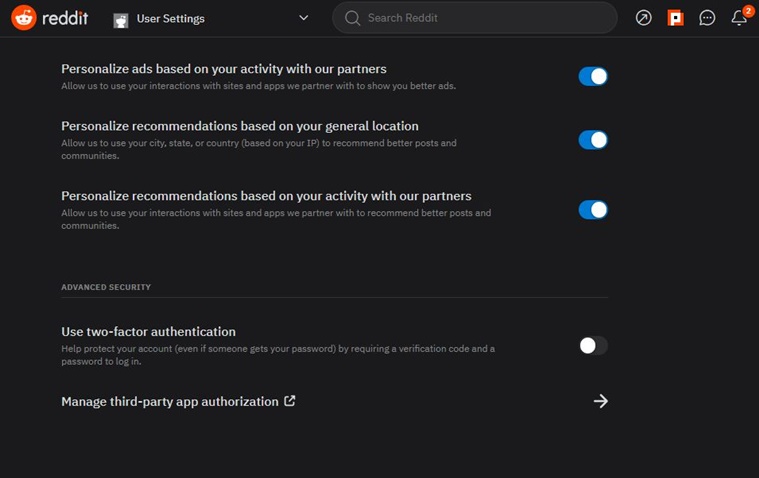 The toggle is buried under the ‘Safety and Privacy’ section in ‘User settings’.(Express Photo)
Also, the process to set up 2FA for Reddit is a bit different depending on if you are using the new Reddit interface or the old one. Follow the steps below to enable two-factor authentication for your account.
1. Open Reddit on your favourite web browser and log in to your Reddit account.
2. Now, click on your profile icon from the top right of the screen and click on ‘User Settings’.
3. Navigate to the ‘Safety and Privacy’ tab that appears on the top and scroll down to find ‘Use two-factor authentication’.
4. Enable the toggle and Reddit will now ask you for your account password. Type it and the website will now help you set up 2FA.
If you are still using the old Reddit, instead of ‘user settings’, you need to click on ‘preferences’ and find the 2FA option under the ‘password/email’ tab. The steps after that are the same.
After setting up 2FA, Reddit may ask the user to re-login to the platform. Now every time you log in to your account, you will be asked for a 6-digit code from your authenticator app.
Another important thing to note here is that since 2FA is set up using your phone, you will need to disable it before transferring to a new phone. Also, make sure you back up your 2FA code in case you lose access to the device on which 2FA was set up.