2 min read
© IE Online Media Services Pvt Ltd



 New security features are now available for Galaxy smartphones, running on OneUI 6 (Image credit: Samsung)
Samsung Galaxy smartphones run on a customised version of Android called OneUI, and the company recently started rolling out the latest OneUI 6, based on Android 14 OS with several new features and visual overhauls, including a new quick settings panel. As a part of the OneUI 6 update, Samsung has also added several new security features, which makes Galaxy smartphones, running on Android 14 a lot more secure, and one such feature is auto blocker.
Samsung’s auto blocker on OneUI 6 can quickly improve the security aspects of your Galaxy smartphone and make your device more secure and less susceptible to hacks and ransomware. When enabled, auto blocker blocks app installations from unauthorised sources, turns on security checks, and blocks commands by USB, which prevents the injection of malicious apps or code via the charging port.
This new technology also enhances security by automatically blocking images that include malware in messaging apps.
CERT-In has published Vulnerability notes on its website (13-12-2023)
CIVN-2023-0361 – Multiple Vulnerabilities in Google Chrome for Desktop
CIVN-2023-0360 – Multiple Vulnerabilities in Samsung Products
Details are available on CERT-In website (https://t.co/EfuWZNuFJC)— CERT-In (@IndianCERT) December 14, 2023
To enable auto blocker on Samsung smartphones, running on Android 14 OS-based OneUI 6, go to settings > security and privacy > auto blocker > and turn it on. Do note that Samsung is using MacAfee technology to scan for suspicious activity in apps and one has to accept the user license and privacy policy to use this feature.
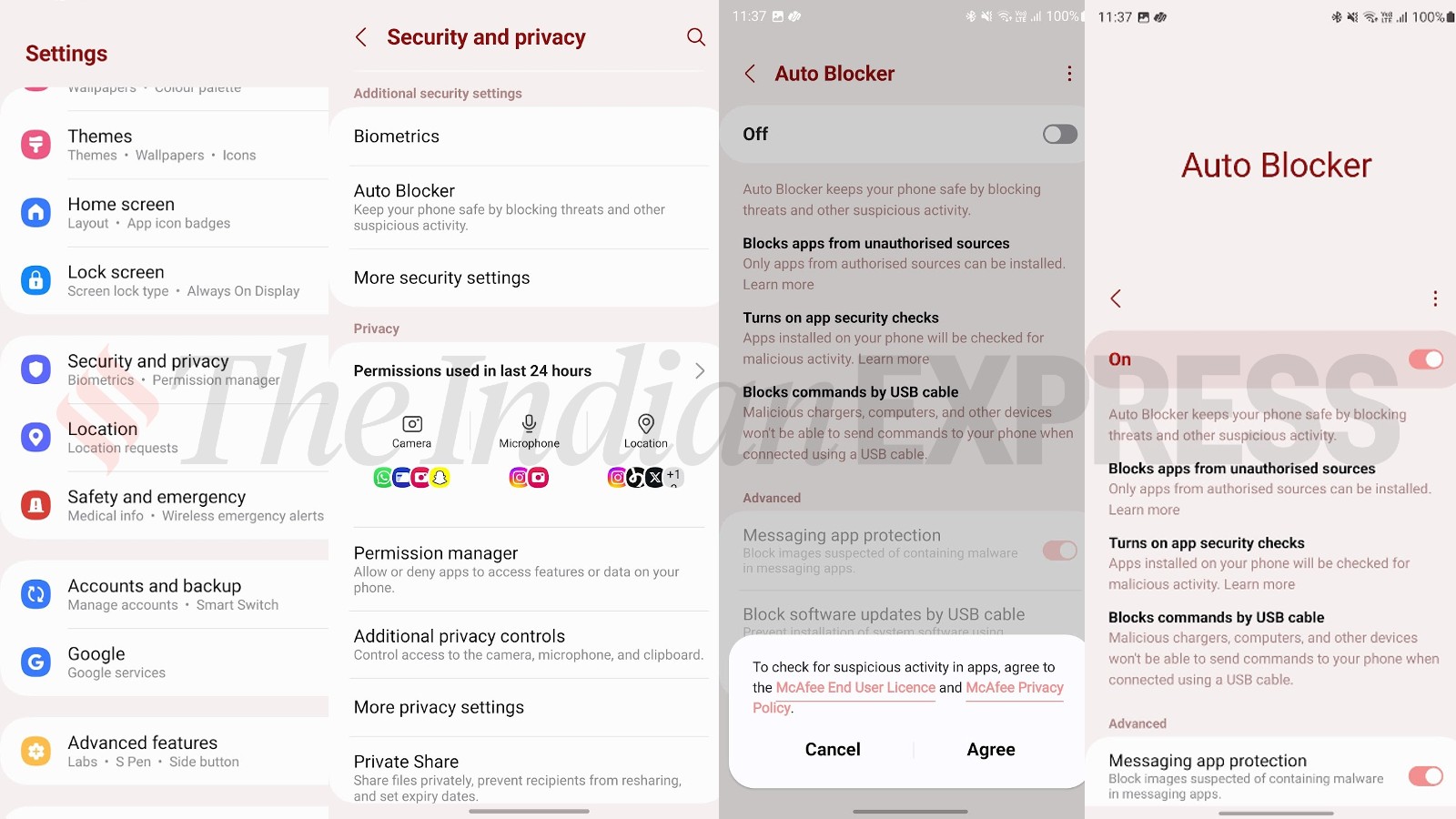 Auto Blocker feature on Samsung Galaxy S23 Ultra running on OneUI 6 (Express Photo)
While the enhanced blocker does introduce an additional layer of security on Samsung Galaxy smartphones, it also does compromise on some aspects. This includes, not being able to sideload unauthorised apps, and not being able to update the software via a PC.