3 min read
© IE Online Media Services Pvt Ltd



 Prime Video is a premium streaming platform from Amazon.
Are you tired of watching an unwanted trailer on Prime Video just before you start watching a movie or a series of your choice? Do you know that you can disable the autoplay trailer feature on Prime Video?
In this tutorial, we will explain the process of disabling trailer/ad autoplay on Amazon Prime Video. Do note that, these changes can only be made by accessing Prime Video on a desktop web browser. Once the changes are made on a desktop, they will apply across the platforms, and the auto trailer playback will be disabled on smart TVs, smartphones, and the web version of Prime Video.
First, you need to have Amazon Prime subscription to access Prime Video. Follow the below-mentioned procedure to disable automatic trailer/ad playback on Amazon Prime Video.
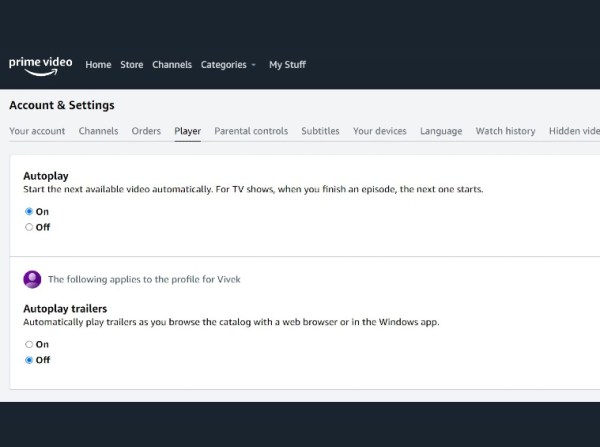 This menu can only be accessed via a desktop web browser.
Post this procedure, close the Prime Video tab on your computer, and reopen the same on a desktop or access Prime Video on your smartphone or a tablet. Amazon Prime Video will stop the auto-ad playback on the selected profile and will start playing the content that you have chosen.
Similarly, Amazon Prime Video also allows users to disable the auto playback of the next episode when watching a web series. The same has to be toggled off from the accounts and settings menu. This will give more control to the user instead of auto-playing the next episode by default.
Do note that, if you have more than one profile, the setting has to be changed on all the profiles manually to disable ads on Prime Video. Given Prime Video is a premium OTT platform, it is good to see that Amazon has given the option to control the advertisement playback on the Prime Video platform.
The company has buried these settings deeply in the menu to make it hard for users to find the same. Amazon does advertise some of the shows and movies that have been recently made available on Prime Video and disabling the same would hurt the platform in promoting the new content to its users.