Twitter may not be built for videos but it’s still a surprisingly good source for interesting clips. So good, in fact, that you’d want to share a lot of those so that everyone can share in the fun. Unfortunately, while Twitter does allow saving photos in just a few clicks, with videos it’s a different story. None of the Twitter apps or even the desktop site currently support video downloads. But as is the case with everything, there are workarounds. With the use of third-party apps, users can save Twitter videos to their devices. And the best part? It’s a lot easier than you’d expect.
Downloading Twitter videos on an Android device:
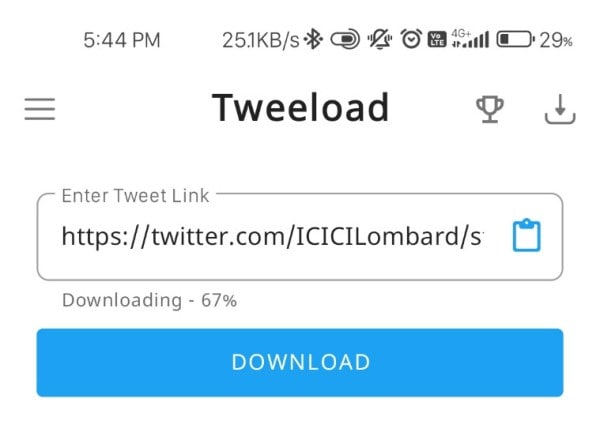
There are a ton of apps on the Play Store for the purpose but we recommend Tweeload due to its ease of use and the well-designed interface. Once the app’s installed, follow the steps given below.
You’ve Read Your Free Stories For Now
Sign up and keep reading more stories that matter to you.
Find the tweet containing the video you wish to share, hit the share icon, and tap on “Copy Link.”
After copying the link, open Tweeload and paste the URL into the text field at the top of the screen. Just use the blue clipboard icon for it.
Once that’s done, hit the download button below.
That will automatically save the video to your gallery from where you can easily share it. Alternatively, you can also hit the download icon at the top-right corner to find downloaded videos.
Downloading Twitter videos on an iOS device:
To download Twitter videos on iPad or iPhone, we’ll be using the Shortcuts app, which you can download through the App Store. Once the app’s installed, follow the steps given below.
Open the Settings app on your iOS devices and scroll down until you find the Shortcuts app in the list.
Tap on it and give it the “Allow Untrusted Shortcuts” permission by toggling it on
Open this link on your device and click on Get Shortcut
The download shortcut for Twitter Video Downloader will open in the Shortcuts app
Scroll down and tap on “Add Untrusted Shortcut”
Next, open Twitter and find the tweet containing the video you wish to share
Tap on the share icon to reveal a new option for Twitter Video Downloader. Select it
The shortcut will launch, and you’ll be asked if you want your downloaded video to be high, medium, or low quality
Once you’ve made your selection, you can find the video in your gallery.
Downloading Twitter videos on desktop/PC:
Open Twitter and find the tweet with the video you want to download
Copy the video’s link by right-clicking on the video and copying its address
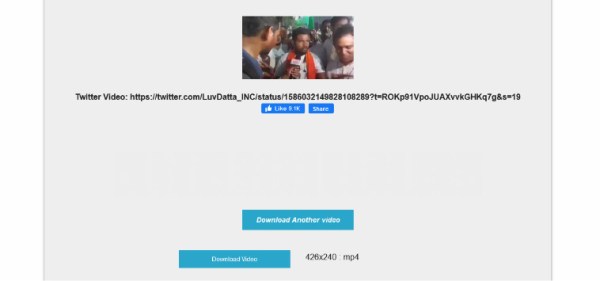
Head over to Twitter Video Downloader next and paste the copied URL in the text box, then click “Download”
The page will reload to reveal several qualities you can download the video in
Click on one of those for the download to autostart