3 min read
© IE Online Media Services Pvt Ltd



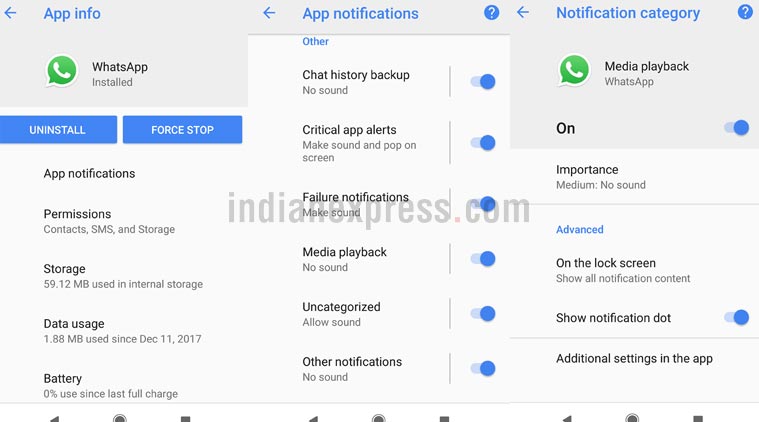 WhatsApp beta version on Android 8.0 Oreo has got support for the new Notifications channel feature: Here’s how to use.
WhatsApp beta version on Android 8.0 Oreo now has support for the new Notifications channel feature. The feature is live in the beta version, so a user will need to sign up as beta tester on the Google Play Store in order to try this out. WhatsApp beta’s latest update will bring more control over notifications from the app in Android 8.0. We were able to see the notifications channel feature live on WhatsApp beta version on a Google Pixel 2. The beta version is 2.18.19, which comes with the new feature.
Notifications channel on Android Oreo will let users manage the various kinds of alert that come up on an app. It gives the option minimise alerts which are not important, and gives control back to the user. However, the app developer will first need to add support for Notifications Channel, in order for users to put this to use.
On WhatsApp, users will have the freedom to disable notifications which are not important, and instead highlight the ones that matter. For instance, one could set all group notifications to low priority if they are part of too many WhatsApp groups and need some peace. In order to use WhatsApp’s notification channels, a user will need to check for two things. First is, that the smartphone has to be on Android Oreo. Second, they need to install WhatsApp beta Android version 2.18.19 on the phone.
Once this is done, just go to settings, Apps & Notifications in the settings, and search for WhatsApp in the list. Tap on WhatsApp, followed by App Notifications. Scroll down and one will see various options on how to manage notifications on WhatsApp. The messaging app has 10 kinds of notifications listed and these are as following: Group notifications, Message notifications, Chat history backup, Critical app alerts, Failure notifications, Media Playback, Uncategorised, Other notifications, Sending media, and Silent notifications.
WhatsApp will let users customise how the system should handle these kinds of notifications. For instance, a user can put Media Playback on high priority in the notifications and also let such notifications override Do Not Disturb feature. Or one can block all such notifications or set priority to low. A user will have to tap on each kind of notification and give the desired setting in order to make full use of this feature.