New Delhi | Updated: September 12, 2022 04:19 PM IST
4 min read
Whatsapp
twitter
Facebook
Reddit
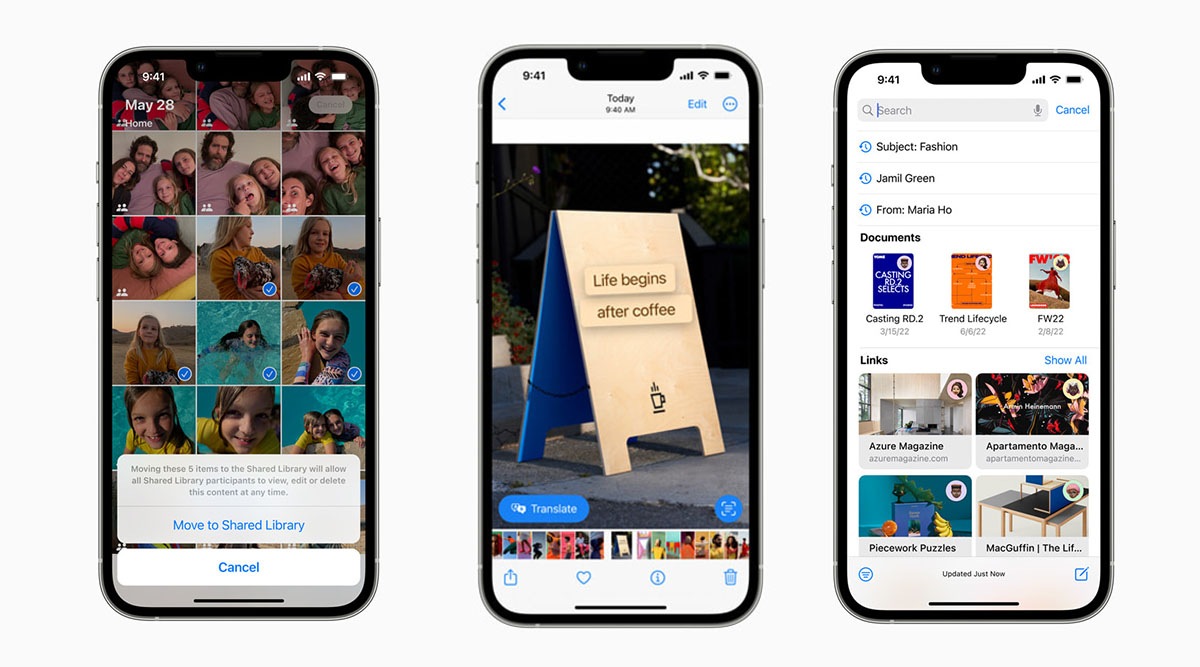
Apple has introduced some new features with iOS, including automatic photo sharing, live translate, and improvements to mail. (Image credit: Apple)
For iPhone users, iOS 16 is a fresh coat of paint that makes your iPhone almost feel ‘new.’ Originally announced during Apple’s keynote address at the Worldwide Developers Conference (WWDC), the software update for the iPhone will be made available to download tonight. But if you are an Android user, then some of the new features in iOS 16 do not exactly sound ‘innovative’ and ‘different’ from what has been available on Google’s mobile operating system for years.
Here are five such iOS 16 features that Apple ‘borrowed’ from Google and Android.
New lock screen experience
One of the most-talked-about features of iOS 16 is the new lock screen customisation experience that lets you add widgets for quick glances to the lock screen. These include the weather, the battery status of your AirPods, upcoming calendar events and more. The new lock screen on iOS 16 looks fantastic, but it’s a feature that made its debut on Android in 2012 with the launch of Android 4.2 Jelly Bean. In fact, Google allowed users to add a clock, calendar and other elements to the lock screen. With Android 5.0, Google removed this feature but Samsung OneUI still offers predetermined lock screen widgets. Suffice to say, Apple was heavily inspired by Google for a smarter lock screen.
Once iOS 16 becomes widely available, iOS users may find it easier to translate text in captured images via the iPhone’s camera app. All they need to do is open the Camera app, and then point it at the text to be translated. Hard-core Android users will instantly recognise this feature which is available via the Google Translate app, allowing you to point your camera at text to get a translation overlaid into the live viewfinder. While Apple is finally bringing this feature to iOS users, it is limited in nature. Basically, the Translate feature takes a photo and then overlays a translation onto a text in the captured image.
Automatic Sharing in Photos
A highly requested feature in iOS 16 that users wanted for a very long time is shared photo libraries. At last, Apple has made it easy to set up a separate photo library that up to five people can use, thanks to the iCloud Shared Photo Library. For those who are not aware, Google has had shared libraries since 2017. So Apple’s iCloud Shared Photo Library feature has been lifted directly from Google’s page book, minus a few changes here and there. iCloud’s shared photo library feature can be shared with up to five other people, and each contributor has access to add, edit, favourite, caption and delete photos. In comparison, Google Photos allow ‘unlimited’ contributors to an album, but you also get to use the Partner Sharing feature that limits sharing your library with only one person.
Another feature that made it to iOS 16 but is already available on Android is Live Captions. Apple said Live Captions can transcribe any audio content – FaceTime calls, video conferencing apps, or in-person conversations – in English across the iPhone, iPad and Mac. Google started pushing Live Caption features with the release of Android 10 and are now available in English on the Pixel 2 and later devices. It’s good to see Apple finally catching up with Google and bringing Live Captions to a large number of people.
Undo/schedule sending of emails
iOS 16 will allow users to schedule their email and undo sending. This is something Google first added in Inbox, an experimental alternative to Gmail. Unfortunately, Google killed the Inbox app Inbox in 2019. Anyway, you will be able to use the same features with iOS 16’s in-built Mail app. For iPhone’s Mail app users, the ability to schedule emails to be sent ahead of time and the option to unsend an email when needed (you will get just 10 seconds to cancel sent email) makes Apple’s native mail app competitive with rivals like Gmail.
Anuj Bhatia is a seasoned personal technology writer at indianexpress.com with a career spanning over a decade. Active in the domain since 2011, he has established himself as a distinct voice in tech journalism, specializing in long-form narratives that bridge the gap between complex innovation and consumer lifestyle.
Experience & Career: Anuj has been a key contributor to The Indian Express since late 2016. Prior to his current tenure, he served as a Senior Tech Writer at My Mobile magazine and held a role as a reviewer and tech writer at Gizbot. His professional trajectory reflects a rigorous commitment to technology reporting, backed by a postgraduate degree from Banaras Hindu University.
Expertise & Focus Areas: Anuj’s reporting covers the spectrum of personal technology, characterized by a unique blend of modern analysis and historical context. His key focus areas include:
Core Technology: Comprehensive coverage of smartphones, personal computers, apps, and lifestyle tech.
Deep-Dive Narratives: Specializes in composing longer-form feature articles and explainers that explore the intersection of history, technology, and popular culture.
Global & Local Scope: Reports extensively on major international product launches from industry titans like Apple and Google, while simultaneously covering the ecosystem of indie and home-grown tech startups.
Niche Interests: A dedicated focus on vintage technology and retro gaming, offering readers a nostalgic yet analytical perspective on the evolution of tech.
Authoritativeness & Trust
Anuj is a trusted voice in the industry, recognized for his ability to de-jargonize trending topics and provide context to rapid technological advancements. His authority is reinforced by his on-ground presence at major international tech conferences and his nuanced approach to product reviews. By balancing coverage of the world's most valuable tech brands with emerging startups, he offers a holistic and objective view of the global technology landscape.
Find all stories by Anuj Bhatia here.
You can find Anuj on Linkedin. ... Read More


 4 min read