2 min read
© IE Online Media Services Pvt Ltd



 The ICSI CS test will commence on June 2 and end on June 10 (representative Image/Express Photo)
The Institute of Company Secretaries of India has issued ICSI CS June admit card for Executive and Professional program for both old and new syllabus. Candidates who have registered for CS June examination can download the admit card through the official website of ICSI at icsi.edu. The admit card can also be downloaded from the website link icsi.indiaeducation.net.
As per the official announcement, the ICSI CS test will commence on June 2 and end on June 10. The Institute has also reserved some dates for unforeseen circumstances. The reserved dates are from June 11 to 14. The exam will be administered in a single shift every day from 9 am to 12.15 pm.
Step 1- Visit the official website of ICSI, icsi.edu
Step 2- On the homepage, click on the link for admit card
Step 3- Then candidates need to enter roll number and 17 digit registration number
Step 4- Click on ‘get admit card’
Step 5- ICSI CS admit card 2024 June will be displayed
Step 6- Download the admit card and take a print out for future reference.
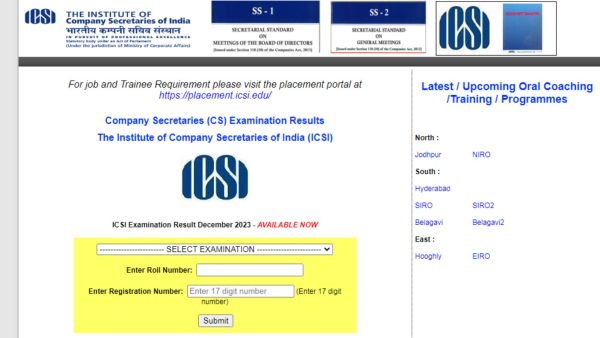 Candidates should enter log in credentials to download admit card (Representative Image/Screengrab)
Candidates should take a printout of the admit card and are advised to carefully verify all the details like name, photograph, signature, registration number, stage of examination, examination centre, optional subject, medium and module or group of examination, dates and time of examination, details of paper-wise exemption granted.
In case of any query or discrepancy, candidates have to contact at the email id- enroll@icsi.edu. For more related details candidates can check the official website of ICSI.
ICSI also conducts the CSSET exam, which is designed to evaluate the skills and knowledge of individuals who want to persuade their career in company secretaryship. CSEET is conducted four times a year, in January, May, July, and November.