


© IE Online Media Services Pvt Ltd
Tags:


Google has a wide array of apps that are some of the most widely set of services used around the globe. From Google Maps to Chrome, users around the world rely on these apps on a daily basis.
The company’s network of interrelated apps and services record a great deal of personal information about you, such as your search history as well as your mobile device’s location.

Google makes use of location data to improve the experience on its services — like providing location-based search results, tracking real-time traffic, location data for your photos and more.
While these services are enhanced to a large extent because of Google’s location tracking, users may feel the need to disable to same because of privacy concerns.
In case you don’t want Google to track your Android phone, you can easily disable the same. Read on to know more.
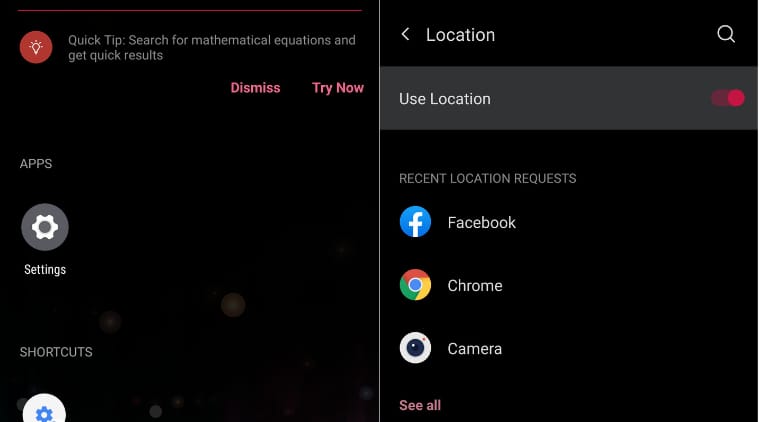
1. Tap on the Settings app on your Android phone.
2. Tap on the “Location” option on your device
3. You can turn off the feature at the top of the page by swiping the button to the left. It should change from ‘On’ to ‘Off’.
Note: Disabling the location toggle will stop every app on your device from sending or receiving location data.
You can also turn off the Location History feature by visiting your Google account. By doing the same, location tracking for all Google apps and services will be disabled with a single swipe.
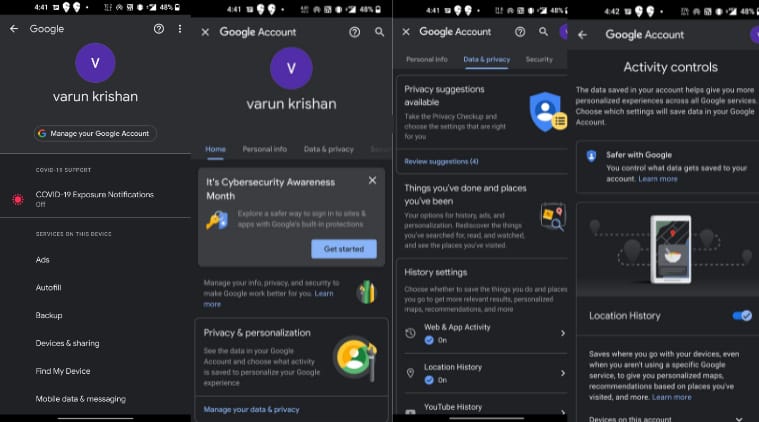
1. Go to the Settings app on your device and tap on “Google.”
2. Select the ‘Manage your Google Account’ option.
3. Once you are inside your account page, tap “Privacy & personalisation.”
4. In the Activity controls section, tap “Location History.”
5. Switch off Location History by swiping the button to the left.


