3 min read
© IE Online Media Services Pvt Ltd



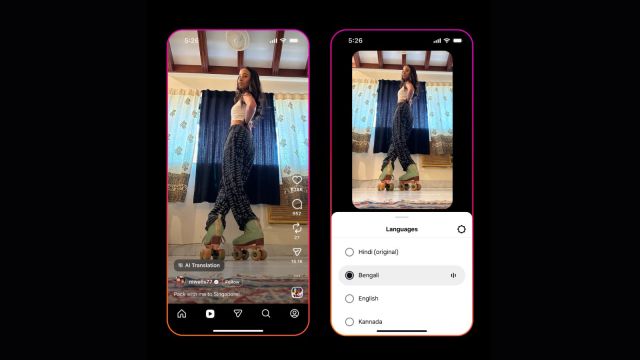 A lip-sync option can also be enabled, automatically matching mouth movements to the translated audio, making it appear as if the creator is speaking the new language. (Image: Meta)
Meta has announced two new Instagram updates focused on expanding language accessibility and creative expression in India. The features were unveiled at the ‘House of Instagram’ event in Mumbai on Friday, reflecting the growing role of Indian audiences and creators across Meta platforms.
The first update expands Meta AI translations for Reels to five additional Indian languages. Over the coming months, users on Instagram and Facebook will be able to translate video content in Bengali, Tamil, Telugu, Kannada, and Marathi. This builds on the translation tools launched in October, which currently support dubbing and lip-syncing between English, Hindi, Spanish, and Portuguese.
With this expansion, creators will be able to transform their reels to sound fluent in more languages while retaining the original voice qualities. Meta says the system maintains the speaker’s tone so the translated version continues to feel personal and familiar.
A lip-sync option can also be enabled, automatically matching mouth movements to the translated audio, making it appear as if the creator is speaking the new language. This aims to help creators reach wider audiences and grow engagement beyond language barriers.
Instagram is also introducing new Indian fonts within the reels editing tools. Users will now have access to Devanagari and Bengali-Assamese scripts for text and captions, accommodating languages such as Hindi, Marathi, Bengali, and Assamese. The update will first roll out on Android, with creators able to access these styles directly through the “Text” tool while editing.
If a user’s device settings are already configured in one of these regional scripts, the supported fonts will appear by default. Others can scroll within the font list to filter styles by language.
How is this supposed to run?
These changes follow a run of recent updates that aim to simplify editing and expand creative options. New tools include bulk caption editing, video reversal options, added lip-sync features for photos, access to more sound effects, and AI-assisted visual restyling in Stories.
Meta stated that these upgrades are designed to give creators more control over how they express themselves while opening opportunities to grow audiences across India and internationally.