2 min read
© IE Online Media Services Pvt Ltd



 Deepfakes came into limelight after Taylor Swift's explicit deepfakes appeared on Google Search. (Image Source: Pixabay)
Earlier this month, Google announced that it is cracking down on non-consensual explicit deepfakes and making it easier to remove from search results. The tech giant also unveiled a new option that makes it easy to get to request Google to remove explicit deepfake porn.
If your nude images or videos are appearing on Google Search or a webpage, the easiest way to ask the search giant is by filling up a web form.
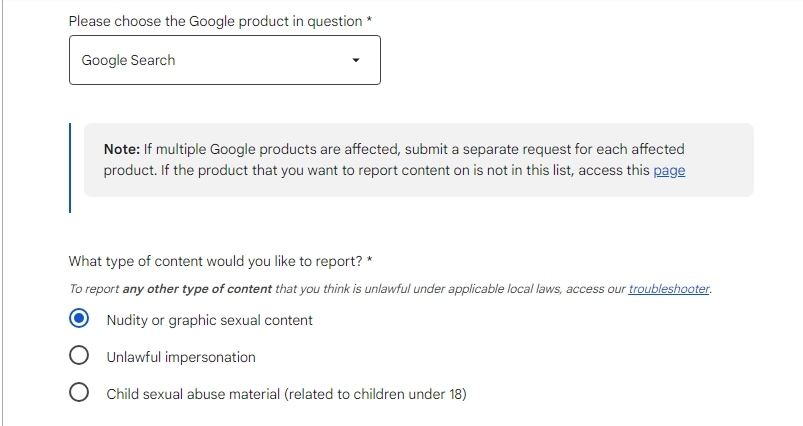 Google has a form that lets you ask them to remove non-consensual explicit deepfake content. (Express Photo)
1. Open the web form by clicking on this link.
2. Under the multiple options, choose the option that says “Content contains nudity or sexual material”.
3. Now, choose your country of residence. If you live in India, Google will redirect you to a country-specific dedicated form, which can be accessed using this link.
4. Here, click on “Google Search” from the drop-down menu and choose the option named “Nudity of graphic sexual content.”
5. Scroll down and you will have to fill in some information about yourself, including your legal name, and email address and clarify on whose behalf you are acting upon.
6. It also requires users to mention the URL on which they saw the deepfake content, attach a screenshot and mention the reason why they want it removed.
7. Once done, click on the “Submit” button and you are Google will verify if the information is true, after which it will be removed from search results.
One thing to note here is that Google will require your digital signature in the form, which is as valid as your physical signature, so make sure you mention everything clearly and correctly and verify the information before hitting the submit button.