2 min read
© IE Online Media Services Pvt Ltd



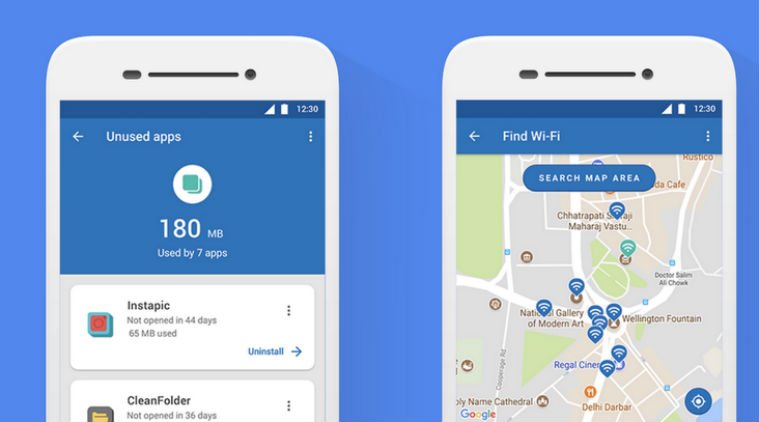 Datally app can be downloaded from the Play Store and it works on all phones running Android 5.0 lollipop or higher.
Google Datally app, which helps users control and save data on their phones, has been updated with four new features. These include daily limit, guest mode, unused apps, and Wi-Fi map. The features have been rolled out. Datally app can be downloaded from the Play Store and it works on all phones running Android 5.0 lollipop or higher. Users can also monitor their phone’s data usage on an hourly, weekly, or monthly basis and even get recommendations for how to save data.
The Guest Mode feature will prove to be useful for people who frequently lend their phone to friends family for data usage. It lets users set the amount of data they are okay to let another person use. The data limit can be set before a user hand over their phone to others. Datally’s new Daily Limit feature allows users to control their daily data usage by letting them set the maximum amount of data they want to spend per day. Users will get warnings when they are on the threshold of exceeding the daily limit, post which they can either choose to block data for the rest of the day or keep going.
Also Read: Google ‘Datally’ app helps you save on mobile data, find public Wi-Fi hotspots
Datally’s new Unused Apps feature shows users the apps they are not using, but are leaking data in the background. The app will prompt users to uninstall an unused app. “Did you know that for many people, 20 percent of mobile data is used in the background by apps they haven’t opened in over a month?” Google said in a blog post. Wi-Fi Map displays users all of the nearby Wi-Fi networks that they can connect to. Google also gives users an option to rate a network after they connect.