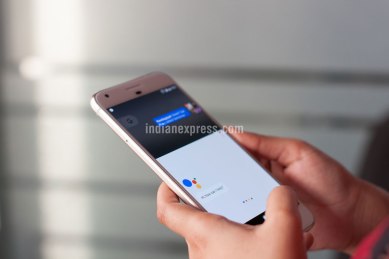
Google Assistant tips and tricks: Here’s how can do more with your smartphone.
Google Assistant is omnipresent – it lives in our smartphones, on Android watches still in use, and yes Google Home devices, though of course the latter have not yet arrived in India. This virtual assistant learns your voice over time and adapts to your surroundings. Google Assistant is useful in a sense that it lets you do a lot of things , through a voice-based interaction.
Ask the Assistant to control your music, search news, set an alarm, track your calendar, or even get diet tips. There’s so much you might not know about Google Assistant and its capabilities. Here’s a handy guide which might help you to take full advantage of this personal assistant.
You’ve Read Your Free Stories For Now
Sign up and keep reading more stories that matter to you.
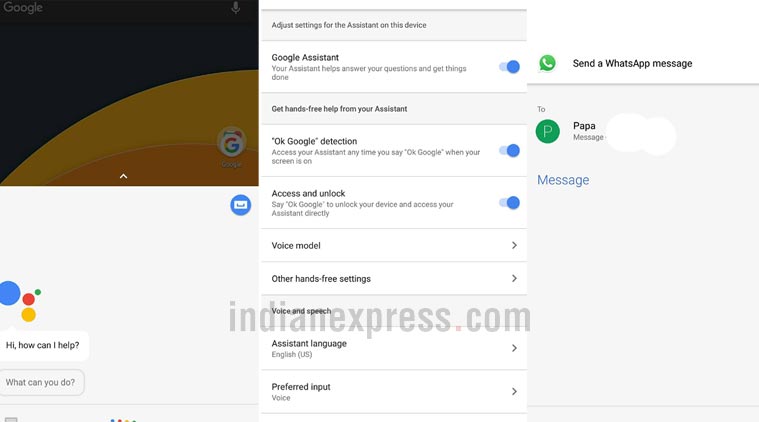
Google Assistant’s functionality is beyond playing music and cracking a joke. One of the features I liked the most about the Assistant is the option to unlock my Android phone. If your phone supports Google Assistant (well, every new phone on Android Marshmallow and above supports it), you can unlock the device by saying “OK Google”.
Under the Assistant’s settings, head over to “Phone”. Now tap on the “OK Google detection” feature. Turn on the toggle for “Trusted Voice” to give Assistant permission to unlock your device when it hears you say “OK Google”. The whole process takes a couple of seconds to match your previously recorded “OK Google” voice.
Google Assistant offers a variety of functions and here’s how to use some of them.
Access your Google Photos
For those of us who backup photos to Google Photos, the Assistant can access them with your permission. For instance, you can ask the Assistant to search all photos you’ve taken at a certain place. The Assistant can even search for a photo you took on a particular date, year or month. However, do remember to say “my” photos when you request the Assistant to search photos in Google Photos. Otherwise, it will search for random photos on the web.
Access Google Photos, see upcoming flights on the Google Assistant.
Check your next flight date
Story continues below this ad
Google Assistant knows the exact date on which you will fly out for your vacation, provided the tickets came to your Gmail account on the phone. For example, just say, “OK Google” and then ask when is my next flight. The Assistant will get the details of your upcoming flights. Also, you can ask the Assistant to check whether the flight is on time or not.
Search for a movie on Netflix
Not sure many would like to search for a movie on Netflix using the Assistant, but it always works accurately. All you need to say “OK Google” followed by what you want to watch: “Watch Baahubali 2 on Netflix“. The keyword here is watch followed by the name of your show and Netflix. It also worked to open a show like Brooklyn Nine-Nine on the app. Google Assistant recognises your voice and fires up Netflix.
Google Assistant can be used to unlock a phone, send WhatsApp message as well.
Send a WhatsApp message
Google Assistant can send messages to your contact of choice. Instead of typing a message, you can record an audio clip. Just tap on the Assistant and say “OK Google”, “Send a voice message to Rahul”. Once you record your message, the Assistant will then send the message to the contact. This is an easy to way to send a message instead of typing.
Story continues below this ad
Although Google Assistant is recording your voice, the message will be delivered in the form of text. I would not say this is 100 per cent accurate, but it will improve once you start using the feature on a regular basis.
Anuj Bhatia is a personal technology writer at indianexpress.com who has been covering smartphones, personal computers, gaming, apps, and lifestyle tech actively since 2011. He specialises in writing longer-form feature articles and explainers on trending tech topics. His unique interests encompass delving into vintage tech, retro gaming and composing in-depth narratives on the intersection of history, technology, and popular culture. He covers major international tech conferences and product launches from the world's biggest and most valuable tech brands including Apple, Google and others. At the same time, he also extensively covers indie, home-grown tech startups. Prior to joining The Indian Express in late 2016, he served as a senior tech writer at My Mobile magazine and previously held roles as a reviewer and tech writer at Gizbot. Anuj holds a postgraduate degree from Banaras Hindu University. You can find Anuj on Linkedin.
Email: anuj.bhatia@indianexpress.com ... Read More