Don't let anyone know your dirty secrets. (Image credit: Anuj Bhatia/Indian Express)
Your iPhone has seen every side of you and knows your weaknesses well. It holds everything from a picture of your ex, to a painful memory and even intimate photos. But human nature is such that we are in constant fear someone will see them, especially a stranger. You, obviously, don’t want this to happen. If you are not comfortable deleting them permanently, you can hide them by using a secret hidden photos feature on the iPhone or iPad.
This is how you can hide nudes and other private photos on your iOS device.
You’ve Read Your Free Stories For Now
Sign up and keep reading more stories that matter to you.
The simplest way to keep your nude photos and other private photos hidden from the prying eyes of your loved ones is by using the “Hide” feature in the Photos apps. It’s a native Photos app that comes pre-loaded on your iPhone or iPad.
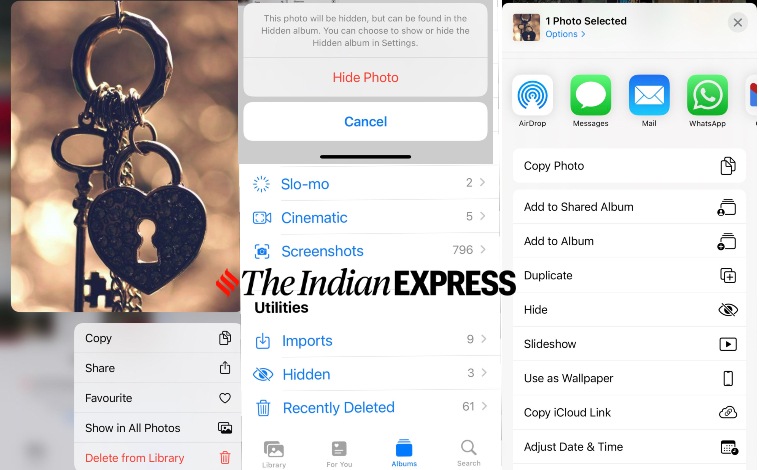
1.) First thing first, go to your photo gallery and find the photo you wish to hide. Now tap “Select” in the upper-righthand corner, then tap the photo to select it.
2.) Next up, go to the bottom left corner of your screen and tap the “Share” icon. Relax, you are not going to “share” it with anyone.
3.) Scroll down a bit, and tap the “Hide” function. Tap the Hide photos to confirm.
There is a way to hide your nude photos on your iPhone or iPad. (Image credit: Anuj Bhatia/Indian Express)
Once you have done that, the selected photos will automatically disappear from the camera roll. The immediate step is to go to the Albums tap, scroll down to the “Utilities” section, and choose the Hidden album. It is to be noted that you have the option to unhide the photos, by selecting them, hitting the Share button, and choosing the Unhide option.
Story continues below this ad
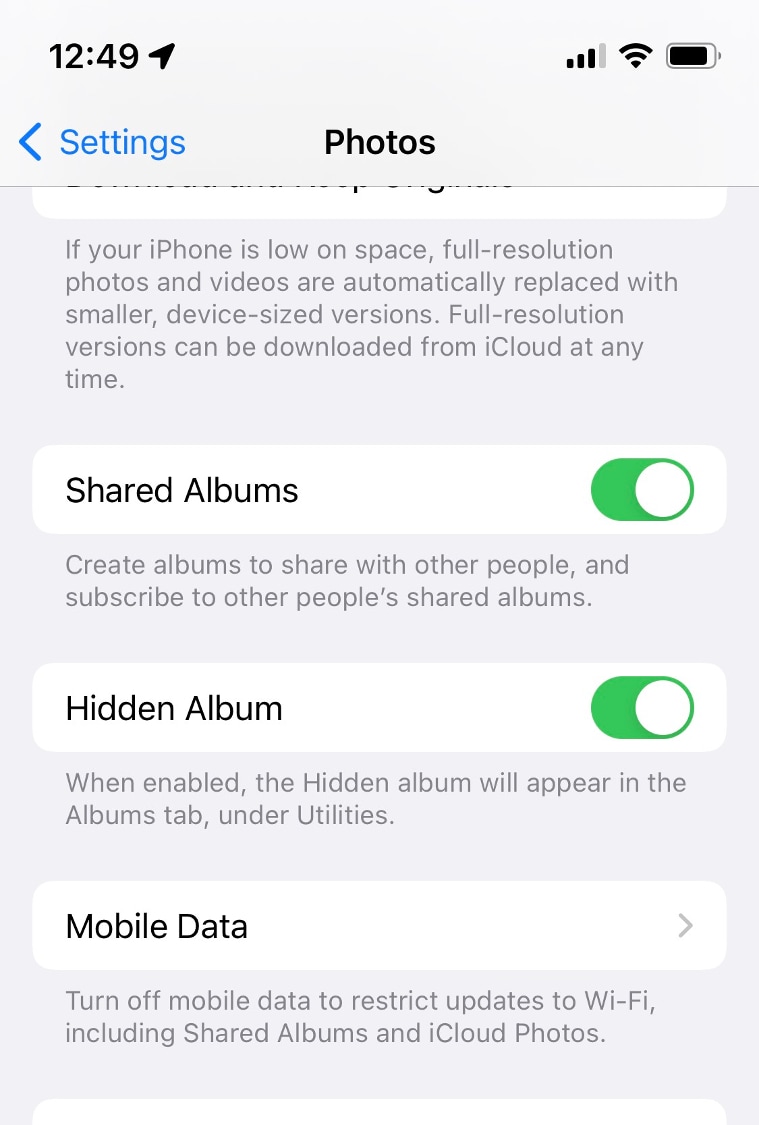
Well, you are still one step away from hiding the album itself. All you need to do is to open the Settings app on your iPhone or iPad, go to the Photos section, and disable the Hidden Album feature. That way all your sensitive photos will be completely hidden from others.
Hide private photos using the iPhone’s Photos app. (Image credit: Anuj Bhatia/Indian Express
Reliable but not 100 per cent foolproof
Keep in mind that if someone knows about this method, chances are they will be able to get access to your hidden photos. The “Hide Photo” feature isn’t a 100 per cent foolproof approach to hide your explicit photos. That being said, the above feature works because not everyone has the time and patience to get deep inside the phone to look out the secret folder where you have hidden your dirty secrets.
If you think the “Hide Photo” feature is not enough to hide your private photos, you can always use third-party photo locker apps such as Calculator+, Keep Safe and Folder Lock among others. Apps like Google Photos also lets you hide your secret photos. Be sure to permanently delete the photos from your iPhone or iPad itself. Because whenever you delete a photo or video from the Photos app, it isn’t completely deleted immediately. The photos are still available to the ‘Recently Deleted’ album, where they are visible for 30 days. To remove those secret photos, open the recently deleted album, and delete the photos/videos once again.
Anuj Bhatia is a seasoned personal technology writer at indianexpress.com with a career spanning over a decade. Active in the domain since 2011, he has established himself as a distinct voice in tech journalism, specializing in long-form narratives that bridge the gap between complex innovation and consumer lifestyle.
Experience & Career: Anuj has been a key contributor to The Indian Express since late 2016. Prior to his current tenure, he served as a Senior Tech Writer at My Mobile magazine and held a role as a reviewer and tech writer at Gizbot. His professional trajectory reflects a rigorous commitment to technology reporting, backed by a postgraduate degree from Banaras Hindu University.
Expertise & Focus Areas: Anuj’s reporting covers the spectrum of personal technology, characterized by a unique blend of modern analysis and historical context. His key focus areas include:
Core Technology: Comprehensive coverage of smartphones, personal computers, apps, and lifestyle tech.
Deep-Dive Narratives: Specializes in composing longer-form feature articles and explainers that explore the intersection of history, technology, and popular culture.
Global & Local Scope: Reports extensively on major international product launches from industry titans like Apple and Google, while simultaneously covering the ecosystem of indie and home-grown tech startups.
Niche Interests: A dedicated focus on vintage technology and retro gaming, offering readers a nostalgic yet analytical perspective on the evolution of tech.
Authoritativeness & Trust
Anuj is a trusted voice in the industry, recognized for his ability to de-jargonize trending topics and provide context to rapid technological advancements. His authority is reinforced by his on-ground presence at major international tech conferences and his nuanced approach to product reviews. By balancing coverage of the world's most valuable tech brands with emerging startups, he offers a holistic and objective view of the global technology landscape.
Find all stories by Anuj Bhatia here.
You can find Anuj on Linkedin. ... Read More