2 min read
© IE Online Media Services Pvt Ltd



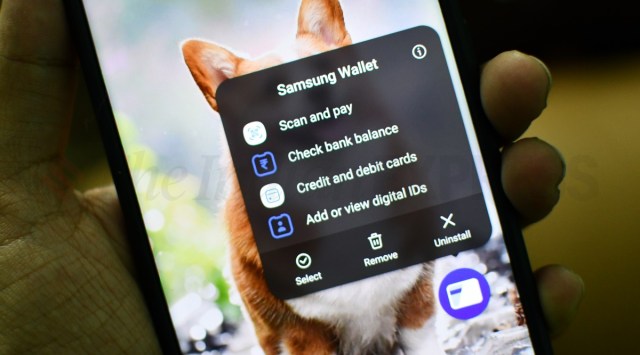 Samsung Wallet allows users to setup UPI IDs for instant payment (Image credit: Vivek Umashankar / Indian Express)
 If you are a Samsung smartphone user, then you may already be familiar with Samsung Wallet, an app that offers various features such as UPI account support, DigiLocker IDs, prepaid wallet, vaccine certification, and more. The company launched its payment service Samsung Pay back in 2017, and it was recently renamed as Samsung Wallet.
Whenever you want to make a payment using UPI via the Samsung Wallet app, you need to open the app, click on the menu, then click on ‘BHIM UPI accounts,’ and finally, click on the ‘scan QR code’ option. This can be a lengthy process, especially for making a simple payment.
Instead, you can create a Samsung Wallet scan-and-pay shortcut on your home screen to make one-click UPI payments using the barcode scanning method. Here’s how to enable it on your Samsung smartphone.
Also read: Deconstructing Samsung Pay: A month with the future of payments, its challenges and opportunities
Long-press the Samsung Wallet app and click on ‘add to the home screen.’ This will create a Samsung Wallet shortcut on your home screen.
Now, long-press the Samsung Wallet icon on the home screen, and it will open the quick menu to access various features.
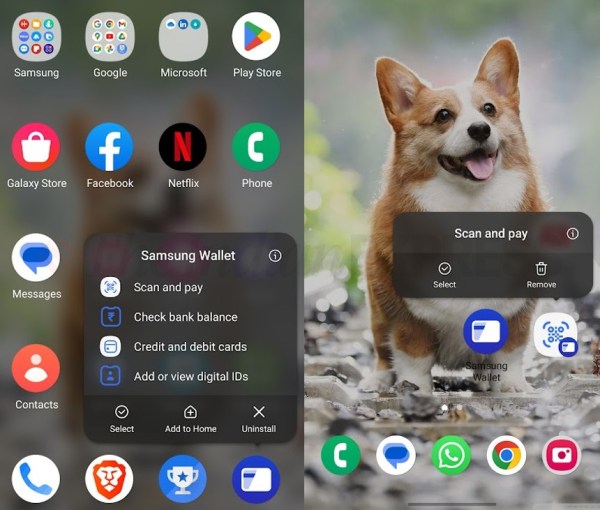 Adding the Scan and Pay shortcut to the home screen will cut down the steps required to make a payment (Image credit: Vivek Umashankar / Indian Express)
Long-press on the ‘Scan and Pay’ option and drop the icon on the home screen.
This will create a scan-and-pay shortcut on your phone, which you can use to make UPI payments by scanning barcodes from vendors.
You can make payments to any vendor that accepts UPI-based payments, such as Paytm, Google Pay, PhonePe, and BharatPe.