4 min read

© IE Online Media Services Pvt Ltd



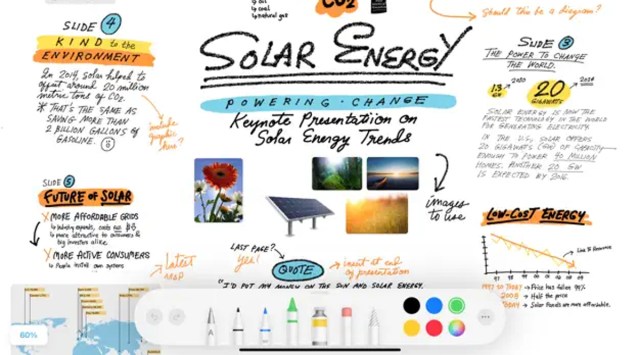 Freeform is similar to Microsoft's Whiteboard app.
 Whiteboards have been a permanent fixture in classrooms and meeting rooms for ages. When students or teammates are working on a project together, a whiteboard often lets them pen their thoughts and ideas, all of which increases participation and gives voice to everyone. Now imagine bringing a whiteboard on your iPhone and iPad screens, allowing you to quickly write, erase, and rewrite ideas. Apple pitches this as a new way to collaborate on projects. The Freeform collaboration app is due for release “later this year” and it does exactly what it promises: creating a culture of collaboration and brainstorming.
There are already plenty of great whiteboard apps. However, not all whiteboard apps integrate as nicely with Apple devices as the Freeform app. So what is the Freeform app, what it does do, and how soon you can get your hands on Apple’s whiteboard app? We will walk you through the Freeform app and how to use it.
The Freeform app will be rolled out as part of iOS 16.2, which is currently in beta but hopefully, the public release is around the corner. Users with iPhone, iPad and Mac will be able to use Freeform, granted your Apple device is running the latest versions of iOS 16.2, iPadOS 16.2 and macOS Venture 13.1. The Freeform app was first announced at the Worldwide Developers Conference (WWDC) in June this year.
Freeform is a collaborative whiteboard app that let people work on a document at the same time. It appears a lot like what Microsoft and Google have been doing for years with their Office and Docs apps. You can take notes, draw, create diagrams and share different forms of content including video, web links, photos and even PDF links in real-time. The idea behind Freeform is the same as other whiteboard apps: everyone can take part and contribute to a project by working together and adding their input.
Freeform isn’t the first-of-its-kind app. In fact, there are some excellent whiteboard collaborative apps already available on the App Store. But what’s unique about Freeform is its easy-to-use interface and the ability to work across Apple devices. That means if your teacher and classmates have Apple devices, Freeform becomes highly useful. However, it lacks cross-platform support. It will work with Apple devices and that means, if your teammate has an Android device, there is no way the two of you can collaborate on a project.
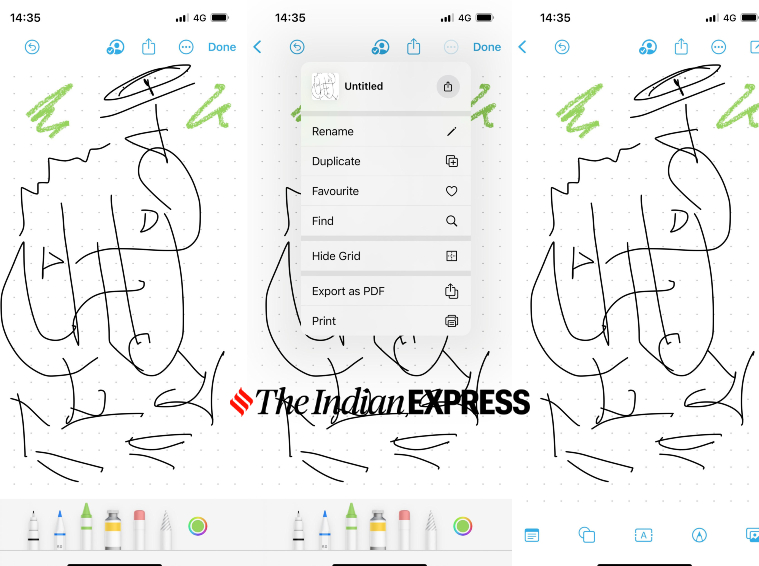 Users can join a session by tapping a link in Message or FaceTime chat.(Image credit: Express Photo)
Once you open the Freeform app, it shows you a blank canvas along with a suite of digital tools needed to take notes, draw or create tables. The interface is similar to Apple’s Notes app and iWork apps, which makes it easy to get onto the Freeform app and start using it instantly.
Choose a set of digital art tools for doodling or sketching, and each of them can be customised to fit your needs with sliders. But as mentioned before, Freeform isn’t limited to taking notes or drawing. You can use empty space to write on, and add images, texts, links and videos to make a project more intuitive.
The interface has a grid where you can insert drawings, sticky notes, text boxes, photos, videos, and shapes. In fact, there are different shapes to choose from, including food, animals, education, symbols, science, places, and people. One of our favourite ways of using the Freeform app is to create a yellow sticky note. You can add text, and edit its colour, and font size. On the iPad, it is possible to use Apple Pencil to write directly on sticky notes (Apple calls them “stickies”).
After you are done collaborating on the project for the day, simply download everything that has been created or written as a PDF or take a printout. This helps ease the pressure of copying notes as the team moves on and you become part of a different project.