2 min read
© IE Online Media Services Pvt Ltd



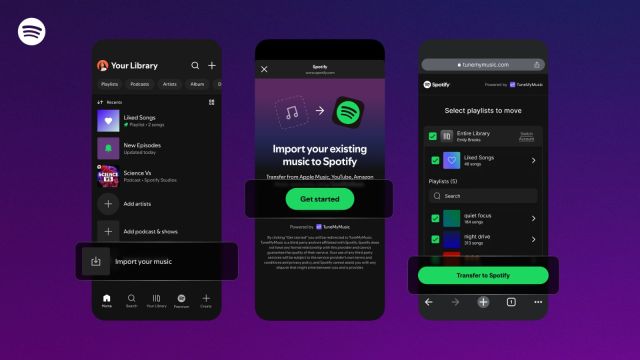 The move marks one of Spotify’s most significant efforts yet to attract subscribers by easing the migration process from competing music apps. (Image: Spotify)
Spotify is introducing a new ‘Import your music’ feature aimed at making it easier for users to switch from rival music services. The tool, now rolling out globally, allows listeners to move their existing playlists directly into Spotify without relying on third-party apps. Mobile users are expected to see the option appear in their libraries over the next few days.
In an announcement, the company said the integration streamlines the process of transferring playlists from other streaming platforms, eliminating the need to rebuild music collections from scratch.
Although Spotify has not released an official list of supported services, the feature works through TuneMyMusic, which currently enables transfers from major music platforms, including Apple Music, YouTube Music, Amazon Music, Tidal, Deezer, SoundCloud, Qobuz, Napster, Pandora, as well as several others.
How to transfer your playlist from a different platform to Spotify?
To initiate the transfer, users can simply open the Spotify app on their phone, navigate to ‘Your Library’, scroll to the bottom, and select ‘Import your music’. They will then be prompted to connect with TuneMyMusic, choose the service they want to import playlists from, and subsequently begin the transfer. The move marks one of Spotify’s most significant efforts yet to attract subscribers by easing the migration process from competing music apps.
According to Spotify, users can utilise all of the platform’s creative features after importing a playlist. This implies that users can make their own cover art, invite friends to work together, or turn it into a shared playlist. Wherever these tools are supported, features like Smart Filters and playlist transition mixing will also function with imported playlists.
Additionally, Spotify stated that its recommendation system considers music from imported playlists, enabling the app to adjust customised playlists like Release Radar and Daylist based on the songs users bring over.