


© IE Online Media Services Pvt Ltd
Tags:


While Apple releases a new iPhone every year, you can actually get the most out of your existing smartphone with a just software update. While some features could be limited to the latest models, regular users can continue to use an iPhone for at least three years without missing out on any major feature.
If you have an older iPhone, here is how you can get the most out of it and make it work seamlessly with all the latest apps and services. Follow these simple little tricks to extend the lifespan of your iPhone and get the most out of your Apple device.

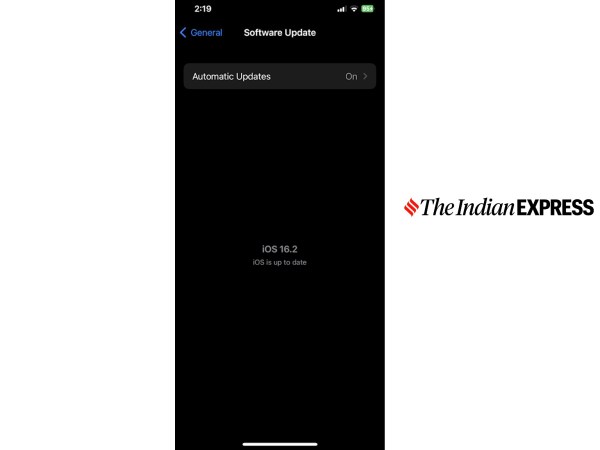
Apple is known for adding newer features with a software updates. An iPhone will receive at least four major iOS updates, which will keep the iPhone secure and up-to-date. With the latest iOS 16.2 update, Apple enabled 5G networking on iPhone 12 and the iPhone 13 series.
Along with new features, the software also offers critical security fixes and fixes an existing software bug in the previous build. Hence, it is always recommended to install the latest software update on your iPhone to keep it up and running.
Go to Settings > General > Software Update to install the latest available iOS version on your iPhone and make sure to have at least 60 per cent battery and a stable internet connection before attempting a software update.
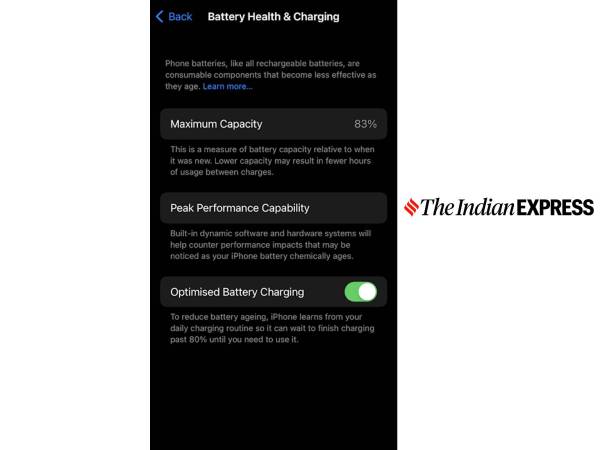
Bought an iPhone a few years before, and it’s no longer lasting all day. While this could be one of the good reasons to get the latest iPhone, you can fix this issue by replacing the battery on your iPhone for a fraction of the cost.
Again, get the battery replaced by an official service centre, ensuring a genuine component. Batteries tend to wear out over time, and it’s best to get a new battery rather than getting a brand-new iPhone.
Go to Settings > Battery > Battery health and charging and check the maximum capacity. It is recommended to change the iPhone if the maximum capacity of the battery is less than 80 per cent.
Apple charges $69 or Rs 5,699 for the battery replacement of iPhone 13 and older models. Similarly, the company charges $99 or Rs 8,177 for the battery replacement of iPhone 14 and the newer models.
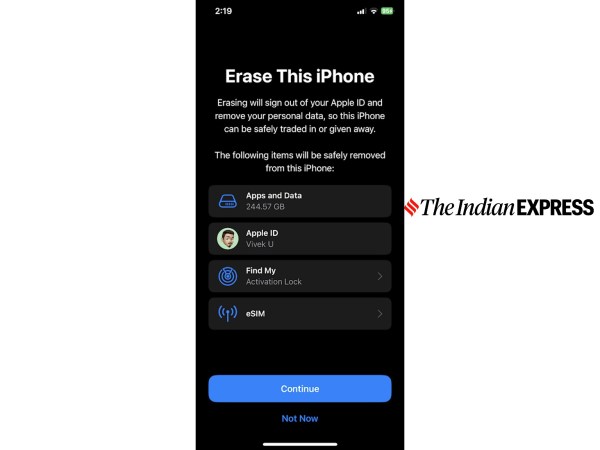
Running out of storage and the iPhone is feeling sluggish? You could solve these issues in some cases by just factory reset your iPhone. Factory resetting will remove all the cache and temp files from the device, freeing up the internal storage and the device resources, which will make the iPhone feel fast.
Make sure to have at least a couple of GBs of free internal space, which will be essential for downloading and installing software updates on Apple iPhones. On top of that, you can also take a backup of your content on Apple iCloud to free up internal storage.
Go to Settings > General > Transfer or Reset iPhone > Erase all content and settings to reset your iPhone.


