3 min read
© IE Online Media Services Pvt Ltd



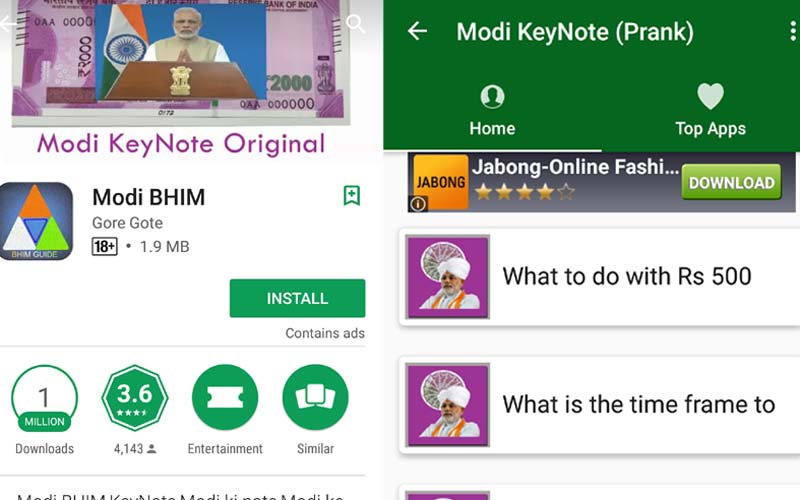 Fake and duplicate BHIM apps, some claiming to be guides are flooding the Google Play Store.
Prime Minister Narendra Modi announced the BHIM app for UPI payments on December 30, and the app has already topped charts on the Google Play Store. While this is good news, duplicate apps are now flooding the Play Store. Apps like Bhim payment updater 2017, Modi Bhim are some of the results you might see. One of the fake apps, called Modi BHIM, is actually an earlier prank app that was launched as Modi KeyNote, which now has BHIM in the name.
Some of the apps claim to offer a guide on how to use BHIM and even give a link to the original app, which is bizarre to be honest. For those who are still wondering how to figure out the right app, here’s a tip. The developer is the National Payments Corporation of India (NPCI) and their official Twitter handle is NPCI_BHIM, which is unverified till now. The Twitter handle is itself warning users from downloading these fake apps, so be careful.
When downloading the BHIM app stick to the official Google Play Store. Don’t rely on third-party app stores, even if they came pre-installed on your phone. The developer has to be NPCI, and no one else. Any app claiming to be developed with a “gov.in” somewhere in the name is fake and possibly a malicious app.
Interestingly, the Modi BHIM prank app has already crossed 1 million downloads on Google Play Store. The app claims to verify the authenticity of the Rs 2000 note apparently if you scan the note with the app a video of the Prime Minister’s demonetisation announcement is played on your phone. While the app now says it is a prank app, initially many had believed this to be true and were busy scanning Rs 2000 notes via this in order to check if their note was real or not.
Also read: BHIM app for UPI-based payments: Everything you need to know
There is another *99# BHIM UPI Bank No internet app which claims to offer USSD and UPI payments services, and says that the inspiration for this app came from NPCI documents, but that it is not linked to the government. This disclaimer is conveniently placed right at the end of all the details of the app, and it simply lists all the banks offering UPI and their USSD codes. The app has managed to cross 100,000 downloads.
The BHIM update app wants to access the device identity and Photo and Media files. Another Modi BHIM app simply lists a bunch of RBI orders around demonetisation. While some apps are just guides, others are trying to pass off the UI of the BHIM app which is dangerous. Also, it is interesting that these apps have all gotten 4-star ratings so quickly.
For users who are confused about how to use BHIM app, we have a full guide available here. Our advice is don’t download apps claiming to offer guides or with BHIM logo. Stick with the one from NPCI.