3 min read
© IE Online Media Services Pvt Ltd



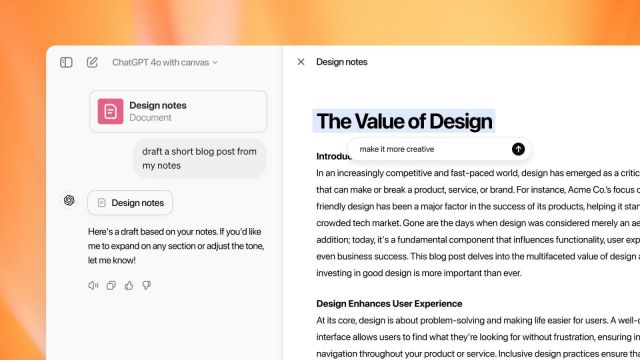 Although it is currently available for ChatGPT Plus users, the AI giant has plans to roll it out for all free users in the future. (Image: OpenAI)
AI giant OpenAI is beta testing Canvas, its new workspace interface for ChatGPT. In its official blog, OpenAI described Canvas as a new interface for working with ChatGPT on writing and coding projects much beyond usual chats. Canvas is currently available for ChatGPT Plus and Team users. Enterprise and Edu users will be able to access it next week.
“Canvas opens in a separate window, allowing you and ChatGPT to collaborate on a project. This early beta introduces a new way of working together—not just through conversation, but by creating and refining ideas side by side,” OpenAI said in its official blog. OpenAI also has plans to roll out Canvas to all ChatGPT Free users once it is out of the beta stage.
Essentially, Canvas is a virtual interface space that allows developers to consult ChatGPT on certain sections of their projects. It opens in a separate window apart from the main chat for users to put their writing or code and even highlight the sections that a developer wants the model to focus on.
According to the official blog, Canvas was built with GPT-4o and can be manually opted from the model picker beta users. OpenAI, in its blog, said that although the existing chat interface is easy to use, it is limited when one wants to work on projects that require frequent editing and revisions. This is where Canvas comes to the aid of developers. The company said that with Canvas, ChatGPT can better understand the context of what a user is trying to build. The interface allows users to highlight specific sections to indicate what they want the chatbot to focus on, such as act like a copy editor, or code reviewer. The interface can give inline feedback and suggestions with the entire project.
The interface is user-friendly and adds to the ease of building complex projects. “You control the project on canvas. You can directly edit text or code. There’s a menu of shortcuts for you to ask ChatGPT to adjust writing length, debug your code, and quickly perform other useful actions. You can also restore previous versions of your work by using the back button in canvas,” read the blog post.
Further, OpenAI said that Canvas opens automatically when ChatGPT feels it could be helpful. Users can also include ‘use canvas’ in their prompt to open canvas and use it to work on existing projects.
When it comes to access, the interface also has several shortcuts meant for writing and coding. Developers can ask ChatGPT to suggest edits, length adjustments, or feedback on writing projects. ChatGPT can also review certain lines of codes, add logs, fix bugs, port coding to a different programming language, etc.