6 min read
Stay updated with the latest - Click here to follow us on Instagram
© IE Online Media Services Pvt Ltd



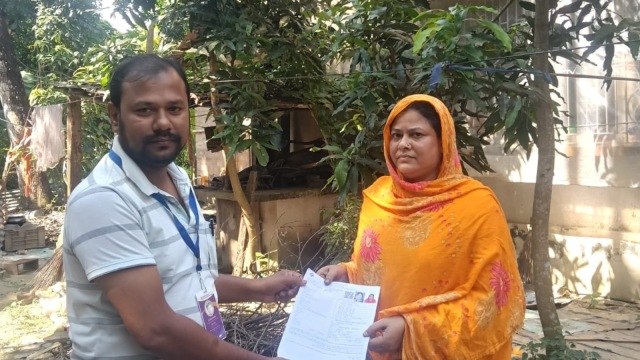 The Election Commission has started SIR Phase 2 and will publish draft electoral rolls on December 9. (Photo via X: @ECISVEEP)
West Bengal voter list 2025: The Election Commission of India has commenced the second phase of the Special Intensive Revision (SIR) of electoral rolls across 12 states and Union Territories.
The poll panel will publish a draft electoral list on December 16 and the final electoral roll on February 14, 2026. If you have submitted your Enumeration Form to your Booth Level Officer (BLO) or online, you can easily check whether it has been uploaded to the Election Commission portal.
If you have already submitted your Enumeration Form to your Booth Level Officer (BLO) or filled it online, you can quickly verify whether it has been uploaded to the Election Commission portal. Follow these simple steps:
Step 1: Visit the website
Open your browser and go to voters.eci.gov.in
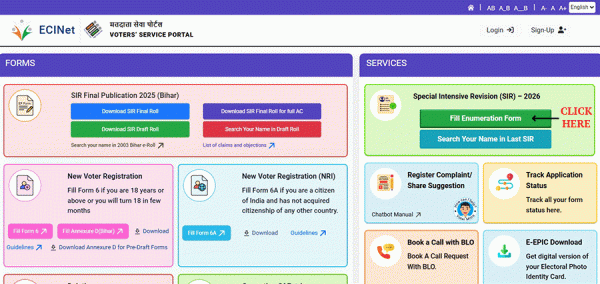 Voters must verify their names against the 2002 electoral rolls between November 4 and December 9 to appear on the draft list.
Step 2: Open the Enumeration Form page
On the homepage, click ‘Fill Enumeration Form’. This will take you to the login or signup page.
Step 3: Sign up (if you are a new user)
Click ‘Sign Up’, then enter your mobile number, optional email ID, and the captcha to complete the registration.
Step 4: Log in (for existing users)
Click ‘Login’, enter your mobile number and the captcha, and then select ‘Request OTP’. Enter the OTP to log in.
Step 5: Go back to the ‘Fill Enumeration Form’ section
Once logged in, your name will appear at the top. Click ‘Fill Enumeration Form’ again.
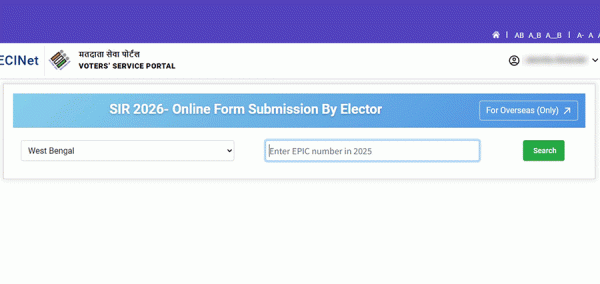
Step 6: Enter your EPIC number
Type your EPIC (voter ID) number in the given box.
 The last such exercise was held in 2002, and it is only natural that many voters who were on that list have moved elsewhere or died.
Step 7: Search for your form
Click ‘Search’. The status of your form will appear instantly.
How to understand the status
Step 8: If your form is uploaded
You will see a message saying:
“Your form has already been submitted with mobile number XXXXX…”
This confirms that your BLO has uploaded it.
Step 9: If your form is not uploaded
You will not see the above message. Instead, a new form page may open.
Step 10: If something seems incorrect
If the mobile number shown is wrong, or the status says ‘submitted’ even though you didn’t submit it, contact your local BLO immediately.
This includes 10 steps:
Stay updated with the latest - Click here to follow us on Instagram