5 min read


© IE Online Media Services Pvt Ltd



 Lenovo Yoga Tab 3 Pro adds a completely new layer to the tablet space now dominated by productivity oriented tablets
The quest to make the tablet more productive continues. But to be fair to the manufacturers, and having used the Apple iPad Pro and the Microsoft Surface Pro 4, I have to say that we are almost there. But there has been no significant Android intervention in this segment so far, though there have been some good tablet options with keyboards. However, Lenovo seems to be offering a different take, with what it calls a video tablet. The Lenovo Yoga Tab 3 Pro adds a completely new layer to the tablet. Here is the review.
Lenovo Yoga Tab 3 Pro
This new tablet too carries forward the Yoga tab design philosophy of offering the stand, hold, tilt and hang options with its hinge-based appendage. Now, the same stand lets the tablet be positioned for user a projector too. Anyway, the Yoga Tab 3 Pro continues to be the most handy of all Android tablets, given that the cylindrical end makes it very natural to hold.
Specs: 10.1 -inch QHD (2560×1600, ~ 299 ppi) display | Quad-core Intel Atom x 5-Z8500 Processor up to 2.24 GHz | 2GB RAM | up to 32GB internal storage | 10200 mAh | Android OS v5.1
Price: Rs 39,990
Watch: Lenovo Yoga Tab 3 Pro First Look
What is good?
I have not seen a brighter screen in a tablet before. It is almost if the light from the projector is coming out this side too. It is also a stunningly crisp QHD screen that you will love working or watching videos on. This is surely one of the best features of this tablet.
Also, the Yoga Tab 3 Pro is almost as good as the iPad Pro when it comes to sound quality. It is certainly as loud. The JBL speakers with Dolby Atmos ensure that the audio quality is not lagging behind when you are using the projector to beam a 70-inch image on the wall.
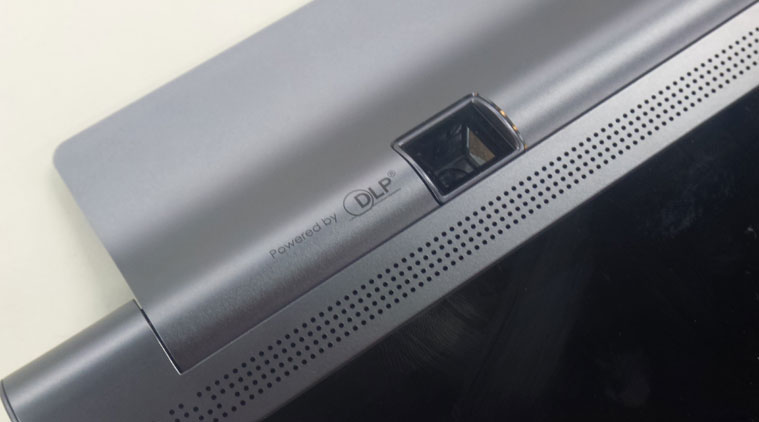 Lenovo Yoga Tab 3 Pro features a rotatable projector which could be a great value add
The rotatable projector is a great value add, for some users. If you are the kind of person who is used to pulling out a presentation every time you want to speak, there can’t be a better device to carry around. Also, for those who travel a lot and would still like to watch their movies or games as if they were in the comfort of their homes. It switches on easily with a single press and stay on as long as you want. Plus there is the advantage of being able to beam in any angle.
This is where the battery comes in. I was impressed that the tablet can run at least six hours with the projector on. That is a great achievement.
It is also a testament of the processor which stays cool and does not drain the battery unnecessarily. The Intel Atom X5 processor is powerful enough to take on most tasks as well as multi-tasking without breaking into a sweat.
I think the UI on Lenovo tablets is the best on any large-screen Android device. It cannot get more functional. Navigation is easy and the real estate is left clutter-free.
What is not that good?
I might be getting too ambitious, but to watch movies I would like the projector to be a bit more brighter than 50 nits. Yes, it might affect the battery. But why not an option to go brighter when you are plugged in?
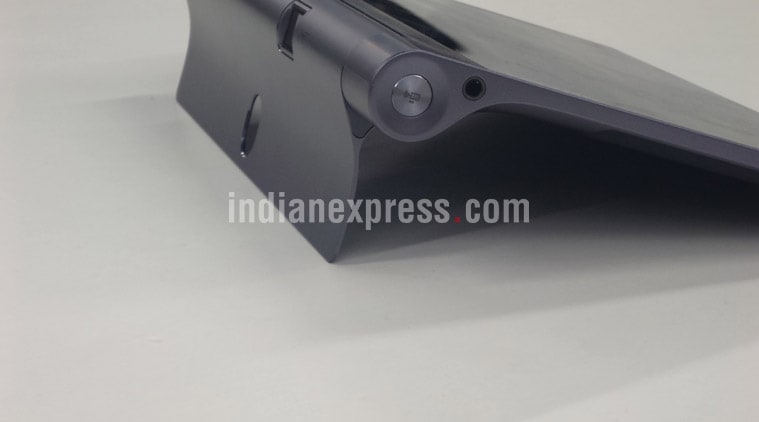 Lenovo Yoga Tab 3 Pro also comes with a handy quick shortcut for its projector function but could have been more brighter
The Lenovo Tab 3 Pro has the power and projector switches on both sides of the cylinder. It takes a while to figure out which is where.
This is not a cheap tablet by any means. You are playing a premium for the great screen and projector. So make sure these are features you will use.
Should you buy
Yes, if you are the sort who plugs into a projector for work or pleasure every other day. This device will add a layer of convenience that is hard to replicate. However, if you don’t have a specific use for the projector, then remember you are paying a good premium for this device.