


© IE Online Media Services Pvt Ltd
Tags:


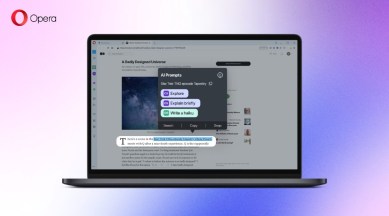
Generative AI has taken the world by storm and is being fast incorporated into devices and apps of all kinds. It was only inevitable that it would eventually reach browsers. After Microsoft introduced a new sidebar with generative AI capabilities, Opera is doing the same. The browser is gaining smart AI Prompts and a feature that lets users quickly access ChatGPT.
AI Prompts are an enhancement of the existing prompt that popped up when text is highlighted. While previously these prompts let you copy or search for selected context, the AI enhancement lets you do a lot more.


That’s not the only way to access the prompts, though, as you can also select text to trigger it.
The other AI integration is direct access to ChatGPT and ChatSonic from the sidebar on the left. Opera hasn’t given these tools its own skin, so clicking on the respective icons for them fires up their websites, albeit in a smaller, more accessible window. This feature was announced back in February by the browser company.
In a similar way, Microsoft’s Edge browser lets users access Bing Chat – the company’s ChatGPT-like AI chatbot — from a sidebar. But unlike Opera’s ChatGPT integration which only lets users chat with the AI chatbot, Edge’s sidebar also comes with a Compose feature, letting users generate content on the fly.
However, what Edge cannot do right now is generate images for you directly. Opera can do this with its ChatSonic integration.
Opera says that its generative AI tools are in “early access” in Opera and Opera GX across all desktop platforms. You can activate them from Easy Setup. Opera GX users will also have to enable the “Early Bird” option in their browser settings.


