The premium Pixelbook is the first convertible Chromebook with Google Assistant built-in.
Google has launched a new high-end Chromebook, called the Pixelbook. The premium Pixelbook is the first convertible Chromebook with Google Assistant built-in. Google Pixelbook is a high-performance machine that can run Android apps and packs an optional Pixelbook Pen. At $999 (or approx Rs 65,000), Pixelbook is pitched for mainstream users, a strategy Google believes will work in the long run. After having tried the Pixelbook at the launch event, here’s my first impressions of the premium Chromebook.
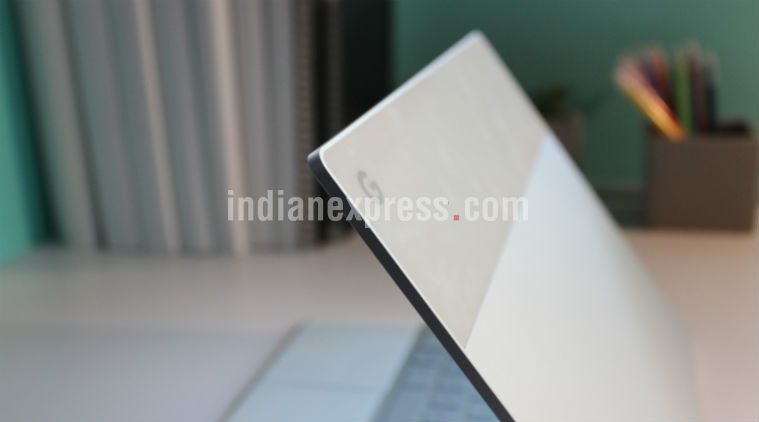
Google Pixelbook doesn’t look like an ordinary Chromebook with a plastic chassis. In fact, the Pixelbook is made out of aluminum and has aesthetics mimicking the Pixel 2 series. Imagine if you took the Pixel 2 and convert into a laptop, and that’s exactly how I would like to describe the Pixelbook. At under 1.0 kg and measuring only 10mm, Pixelbook is a lightweight machine. But many of us are interested in getting a laptop that’s easily fit in the backpack. Isn’t it?
You’ve Read Your Free Stories For Now
Sign up and keep reading more stories that matter to you.
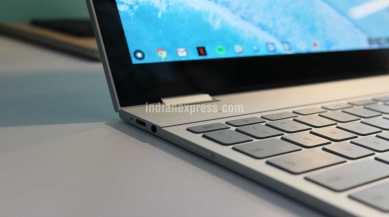
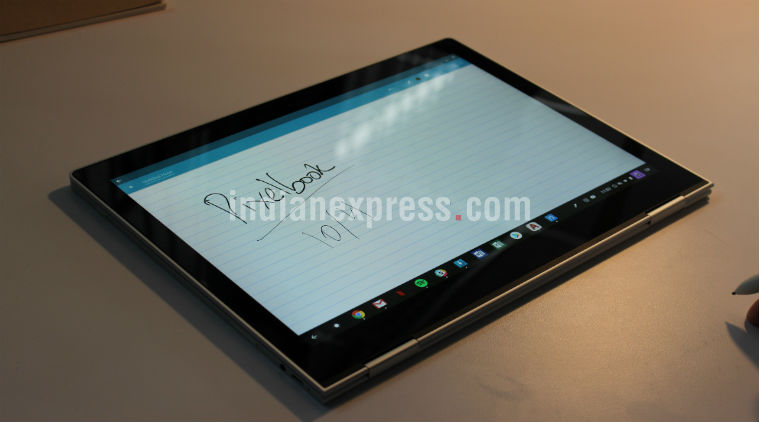
Like Lenovo’s Yoga laptops and 2-in-1s, Google Pixelbook has a 360-degree hinge, meaning you can use the device as a tablet, laptop or stand it in a tent mode. You’ll find a USB-C port on either side, something that tells why Google believes the Pixelbook is a modern day system. And the good news doesn’t stop here. The Pixelbook has a 12.3-inch Quad HD display. The display looks beautiful, which is what we’ve come to expect from a flagship Pixel device.
In case you wondering how the keyboard on the Pixelbook feels like, well, it is par with any high-end notebook I can think of. The backlit chiclet keyboard does feel nice to click to it. Moving on, the touch pad has the accurate size, which didn’t struggle during my use. Yes, it feels responsive.
Google Pixelbook doesn’t look like an ordinary Chromebook with a plastic chassis. Like Lenovo’s Yoga laptops and 2-in-1s, Google Pixelbook has a 360-degree hinge, meaning you can use the device as a tablet, laptop or stand it in a tent mode.
Then there is the Pixelbook Pen, an optional stylus that retails for $99 (or approx Rs 65,000). The Pen felt responsive and was comfortable to hold. I still don’t think that the Pen is a necessary accessory at the moment, but if Google comes with a killer app, chances are people would like to spend $99 on a stylus.
Google Pixelbook runs Chrome OS, which relies heavily on internet for every possible task. But I still believe that the Pixelbook’s biggest feature is the Google Assistant. The virtual assistant is now found on every possible Google product, be it a smartphone or a smart speaker. Google bringing the Assistant to Chromebooks is a nice addition. All you need to say “OK Google, or simply press the button in the keyboard’s bottom row that displays the Assistant logo.
Google Pixelbook runs Chrome OS, which relies heavily on internet for every possible task.
It’d be hard to justify the Pixebook’s $999 price, without mentioning the hardware. The entry-level Pixelbook features an Intel Core i5 CPU, 8GB RAM, and 128GB flash storage. Those looking for a superior performance cam choose the model with Intel Core i7 chip, 16GB RAM, and 512GB of storage. During my demo time, everything runs well on the Pixelbook – from apps to multiple browser tabs.
Story continues below this ad
Google’s vision to blend both the hardware and software seems to be working out. I don’t mind saying that Chrome OS has its own limitations as compared to Windows 10 or Mac OS. However, if I consider the Pixelbook strictly on the basis of hardware, Google has a winner without a doubt. But the biggest pro with the Chrome OS is that works beautifully on a low-end hardware, so you don’t need to spend close to $999 on a premium Chromebook and that’s a catch-22 situation for Google and its new Pixelbook.
Disclaimer: The author is in San Francisco on the invite of Google India, which is paying for accommodation, travel.
Anuj Bhatia is a seasoned personal technology writer at indianexpress.com with a career spanning over a decade. Active in the domain since 2011, he has established himself as a distinct voice in tech journalism, specializing in long-form narratives that bridge the gap between complex innovation and consumer lifestyle.
Experience & Career: Anuj has been a key contributor to The Indian Express since late 2016. Prior to his current tenure, he served as a Senior Tech Writer at My Mobile magazine and held a role as a reviewer and tech writer at Gizbot. His professional trajectory reflects a rigorous commitment to technology reporting, backed by a postgraduate degree from Banaras Hindu University.
Expertise & Focus Areas: Anuj’s reporting covers the spectrum of personal technology, characterized by a unique blend of modern analysis and historical context. His key focus areas include:
Core Technology: Comprehensive coverage of smartphones, personal computers, apps, and lifestyle tech.
Deep-Dive Narratives: Specializes in composing longer-form feature articles and explainers that explore the intersection of history, technology, and popular culture.
Global & Local Scope: Reports extensively on major international product launches from industry titans like Apple and Google, while simultaneously covering the ecosystem of indie and home-grown tech startups.
Niche Interests: A dedicated focus on vintage technology and retro gaming, offering readers a nostalgic yet analytical perspective on the evolution of tech.
Authoritativeness & Trust
Anuj is a trusted voice in the industry, recognized for his ability to de-jargonize trending topics and provide context to rapid technological advancements. His authority is reinforced by his on-ground presence at major international tech conferences and his nuanced approach to product reviews. By balancing coverage of the world's most valuable tech brands with emerging startups, he offers a holistic and objective view of the global technology landscape.
Find all stories by Anuj Bhatia here.
You can find Anuj on Linkedin. ... Read More